Key takeaways
- 01Apple's Workout app has strength workout types but no weight or reps per set; you need a lifting app for that.
- 02Phone-free on the wrist, per their developers: Strong, GymBook and SmartGym.
- 03Companions that rely on the iPhone: LiftLoggr (our app) and GymLogger X; Liftosaur's Watch app needs Premium.
- 04Boostcamp, Alpha Progression, MacroFactor Workouts and RepCount list no watchOS app.
On this page
LiftLoggr is our app. The best Apple Watch app for weightlifting is the one that matches how you carry your phone: if it stays in the locker, pick an app whose Watch app runs on its own (Strong, GymBook or SmartGym, by their developers’ descriptions). If your phone sits on the bench, a companion like LiftLoggr gives you the same one-tap set check and wrist rest timer with your full log on the iPhone.
Apple’s own Workout app has Traditional Strength Training and Functional Strength Training workout types, but it doesn’t record what was on the bar or how many reps you did. That’s the gap these apps fill. Background and setup: how to track weightlifting on Apple Watch.
Every fact below comes from each app’s App Store listing (US), website or help centre, read on 2026-11-14 and linked in the table above. We didn’t test the competing Watch apps on a wrist, so we only report what their developers state.
The decision in one table
| Question | Apps (per developer) |
|---|---|
| Logs sets and reps on the wrist | Strong, Hevy, Liftosaur, GymBook, SmartGym, GymLogger X, Setgraph, JEFIT, Lyfta, LiftLoggr |
| Runs a workout with the iPhone left behind | Strong, GymBook, SmartGym |
| Keeps logging when the phone drops out, syncs later | Hevy (“saves automatically when your watch reconnects”) |
| Needs the iPhone to run the session | LiftLoggr, GymLogger X (start on the iPhone) |
| Watch app costs extra | Liftosaur (Premium) |
| Watch app is free | GymLogger X |
| Watch app included in the same unlock as the phone app | LiftLoggr (pricing below) |
| No watchOS app listed | Boostcamp, Alpha Progression, MacroFactor Workouts, RepCount |
Gymverse, Stronglifts and Liftoff also list Apple Watch compatibility. Their listings don’t describe what the watch app does for set logging, so they aren’t ranked here. Streaks Workout runs on the Watch too, but as a follow-along timer for home workouts, not a set log.
Standalone vs companion: what it changes
Every lifting app’s Watch app falls somewhere between two designs.
- Standalone. The watch holds the routine and the session. You can leave the phone at home and sync later. The cost: the watch has to know your program, last session and settings in advance, and editing on a 45 mm screen is slow.
- Companion. The iPhone runs the session; the watch is a remote with a screen, a Crown and a haptic. The cost: the phone has to be in the gym. The gain: nothing to sync, one source of truth, and the full log, progression and history stay on the phone.
If you train with the phone in a pocket or on the bench anyway, a companion loses nothing. If you train phone-free (running to the gym, a locker you can’t reach), only a standalone app works.
App by app, what the developer says
Strong: the phone-optional veteran
Strong’s listing describes a “fully-featured Apple Watch app to log workouts with or without your iPhone”. Its help centre says you can edit weight and reps with the Digital Crown, use warm-up sets and timers, track heart rate and calories, change a running rest timer with the Crown, and use Live Sync to run the same workout on both devices. Not every iPhone feature is on the watch: the help centre says so directly. Strong syncs workouts to Apple Health, including Activity rings with the watch. Requires watchOS 10 or later and a Strong account.
Hevy: wrist logging with a social app behind it
The listing: “Log sets, start rest timers, and finish your workout without touching your phone”, with heart rate and watch-face complications. “Workouts save automatically when your watch reconnects to your phone.” Hevy writes workouts to Apple Health. Its help centre’s sync troubleshooting asks you to keep the watch close to the iPhone while syncing routines. Hevy also has a Wear OS app, which no other app here offers today.
Liftosaur: powerful, but Premium only
Liftosaur’s Watch app logs sets with the Digital Crown, answers AMRAP and RPE prompts, runs timed sets and shows heart rate. Its rest timer, which starts on its own after every set, can be adjusted on the watch. Two conditions, from its own page: the watch app “needs Premium”, and you must open the phone app once after pairing. Finished workouts go to Apple Health with active calories.
GymBook: phone at home, workout on the wrist
GymBook’s site says you can “log your workouts directly from your wrist whilst keeping your iPhone in your pocket or even at home”. Completed workouts are saved to Apple Health with time, duration and optionally active calories and heart rate, and to Strava. Its App Store label declares Data Not Collected.
SmartGym: built around the watch
The listing says the Watch app works on its own: “No need to use the iPhone with you.” You can change exercises from the watch, and it integrates with Apple Health. The free version allows 2 routines, 3 workouts and 2 measures; everything else is a Premium+ subscription.
GymLogger X: free companion, heart-rate rest
Its developer’s comparison page says: start the workout on the iPhone, then log weight and reps, run the rest timer and see live heart rate on the wrist. The rest timer can follow your heart rate. The Watch app is free, there’s no account, and workouts are saved to Apple Health.
Setgraph, JEFIT, Lyfta
Setgraph: “Access Setgraph’s core functionality directly on your Apple Watch”, plus Apple Health sync. JEFIT: “Live-sync your workout between JEFIT and your Apple Watch”, and the rest timer on the Lock Screen. Lyfta: “Log workouts with Apple Watch”, Apple Health and Strava. None of the three says whether the watch works without the phone.
LiftLoggr on Apple Watch
LiftLoggr’s Watch app is a companion: the iPhone runs the workout, the watch mirrors it and sends every action back. What you can do on the wrist:
| On the watch | How |
|---|---|
| See the current exercise, set circles and target | Now page, first screen |
| See last session’s numbers | “Last: 57.5 kg × 8” under the target |
| Check a set at the target | Check set, one tap |
| Change weight or reps first | Tap the target, turn the Digital Crown, save |
| Rest | Starts when you check a set; +30s or Skip; a haptic when it ends |
| Start today’s scheduled routine | TODAY → Start |
| Heart rate, calories, sets, volume | Metrics page |
| End and save | Controls page; the session saves on the iPhone |
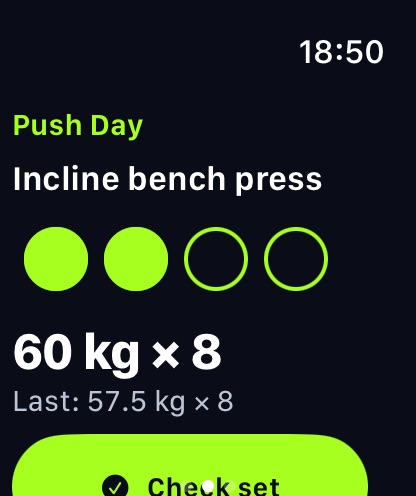
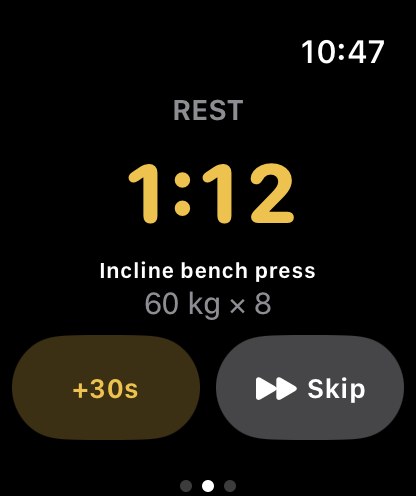
The watch runs a strength workout session while you lift, so heart rate and active calories are measured. One device writes the workout to Apple Health, never both. On the iPhone, the same rest timer sits on the Lock Screen and in the Dynamic Island.
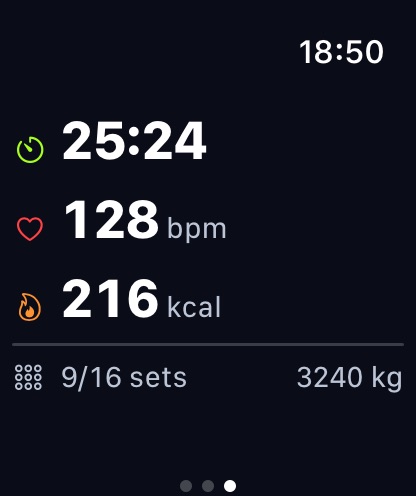
What it doesn’t do: run without the iPhone, build or edit routines, or browse history on the watch. It needs iOS 26 and watchOS 26 or later. The phone and watch talk directly, so no internet is needed. A Wear OS companion ships with the Android app, coming to Google Play in early 2027. Full walkthrough: LiftLoggr’s Apple Watch workout tracker.
Pricing comes from the store: LiftLoggr is free today. LiftLoggr Pro arrives with the December update, and everyone who installs before then keeps the whole app free for good. There is no separate charge for the Watch app.
Which one to pick
- Phone stays in the locker: Strong, GymBook or SmartGym. Check SmartGym’s free limits first.
- You also want a social feed or Wear OS: Hevy.
- You script your program: Liftosaur, and budget for Premium.
- No account, free Watch app, nothing collected: GymLogger X.
- Phone on the bench, no account, backups you can restore, rest on the Lock Screen and the wrist: LiftLoggr.
Five checks before you commit
Run these in your first session, phone on the bench, before you pay for anything.
- Taps per set. Count them for a set done exactly at target. One is the bar to beat; more than two adds up over 20 sets.
- Changing a number. Do one rep fewer than planned and fix it on the watch. Crown or keypad, it should take seconds, not a trip to the phone.
- Rest at the end. Does the watch tap your wrist when rest is over, and can you add 30 seconds without unlocking the phone?
- Phone out of reach. Walk to the water fountain mid-set. Does the check land when you come back, or is it lost?
- Apple Health. After the session, open the Health app. You want one strength workout with heart rate and calories, not two copies or none.
Keep the app that passes all five.
Stay with your current app if…
- Strong or GymBook: you train without your phone. LiftLoggr can’t do that, by design.
- Hevy: you switch between an Apple Watch and a Wear OS watch, or log from the web.
- SmartGym: the watch is your main screen and the phone rarely comes out.
- Apple’s Workout app alone: you only care about heart rate, time and calories, not the numbers on the bar.
Comparing more than the watch? See best workout tracker apps.
How we checked
On 2026-11-14 we read each app’s US App Store listing for watchOS compatibility and the watch features it describes, then the developer’s own help centre or website where one covers the Watch app (Strong, Hevy, Liftosaur, GymBook, GymLogger X). We quote the developer’s wording for anything about working without the iPhone. LiftLoggr facts come from our own app. We re-check every 90 days; report a change on the contact page.
Questions
Does the Apple Watch track weightlifting on its own?
Apple's Workout app has Traditional Strength Training and Functional Strength Training workout types, which record the session, but not the weight and reps of each set. For that you need a lifting app with a Watch app.
Which Apple Watch lifting apps work without the iPhone?
By their developers' own descriptions, checked 2026-11-14: Strong ('with or without your iPhone'), GymBook ('iPhone in your pocket or even at home') and SmartGym ('No need to use the iPhone with you'). Hevy says workouts save when the watch reconnects to the phone.
Does LiftLoggr's Apple Watch app work without the iPhone?
No. LiftLoggr's Watch app is a companion: the iPhone runs the workout and the watch checks sets, edits weight and reps with the Digital Crown and runs rest. Keep the phone in the gym. No internet is needed.
Which lifting apps have no Apple Watch app?
On the US App Store on 2026-11-14, Boostcamp, Alpha Progression, MacroFactor Workouts and RepCount list no watchOS compatibility.
Can I get a rest timer on my Apple Watch?
Yes. Strong, Hevy, Liftosaur, GymLogger X and LiftLoggr all describe a rest timer on the watch. LiftLoggr starts it when you check a set and taps your wrist when rest ends.
Sources
- Apple Support: Workout types on Apple Watch support.apple.com
- Strong Help Center: About Strong for Apple Watch help.strongapp.io
- Strong Help Center: Perform a workout with Strong for Apple Watch help.strongapp.io
- Strong Help Center: Sync with Apple Health help.strongapp.io
- Hevy: App Store listing (US) apps.apple.com
- Hevy Help Center: Apple Watch sync troubleshooting help.hevyapp.com
- Liftosaur: Apple Watch liftosaur.com
- Liftosaur: Apple Health and Health Connect liftosaur.com
- Liftosaur: Rest timer liftosaur.com
- GymBook: features gymbookapp.com
- Lagerland Apps: GymLogger X vs Strong (Apple Watch) lagerland.app
- SmartGym: App Store listing (US) apps.apple.com