Key takeaways
- 01Social feed, web app and Wear OS: Hevy.
- 02Running a whole workout from the Watch without the iPhone: Strong.
- 03Programs you script yourself and full re-importable backups: Liftosaur.
- 04Set-by-set weight recommendations: Alpha Progression. A big free program library: Boostcamp.
- 05No account, offline, restorable backups and rest on the Lock Screen and Watch: LiftLoggr (our app).
On this page
LiftLoggr is our app. The best workout tracker app depends on the one thing you can’t do without: Hevy if you want a social feed and every platform, Strong if you want to run whole workouts from your Watch, Liftosaur if you script your own programs, Alpha Progression if you want the app to tell you the weight for every set, and LiftLoggr if you want no account, offline logging and backups you can restore.
Below: 11 lifting apps, the 7 things we compared, and an honest “best for” for each. Every fact was read from the app’s own App Store listing (US), website or help centre on 2026-11-14 and is linked in the table above. We didn’t install or use the competing apps, and we don’t score what we can’t verify.
Best for, in one table
| If you most want… | Pick | Why (verified) |
|---|---|---|
| A social feed, web app and Wear OS | Hevy | Feed, comments and follows; iPhone, Android, web, Apple Watch and Wear OS (help centre) |
| Whole workouts from the Watch, phone left behind | Strong | “Fully-featured Apple Watch app to log workouts with or without your iPhone” (listing) |
| Programs you write yourself, plus a web editor | Liftosaur | Scriptable programs, web app, account optional (developer site) |
| The weight and reps for every set, decided for you | Alpha Progression | Pro gives “a progression recommendation for every single set” (listing) |
| A big free program library | Boostcamp | “11,000+ programs… The library is free. No ads.” (listing) |
| Workouts built for you each session | Fitbod | “Unlimited personalized workouts” after a 7-day trial (listing) |
| iPhone and Android with one free log | RepCount | Free, “no limit on workouts, routines or exercises”, synced across both (listing) |
| The cheapest pay-once unlock and zero data collected | GymBook | US$22.99 lifetime; label: Data Not Collected |
| No account, free Watch app, zero data collected | GymLogger X | “No account to make”; label: Data Not Collected |
| No account, offline, restorable backups, rest on Lock Screen and Watch | LiftLoggr | Our app; details below |
JEFIT is in the table above for completeness. Its listing is long on features but we couldn’t confirm account, export or offline behaviour from a first-party source, so we don’t give it a pick.
What we compared, and why
We compared seven things you can check before installing. Each one changes what it’s like to log 100 sessions, not just the first.
- Logging speed features. Does the app show last session’s weight and reps beside the set? Does the rest timer start by itself? Is it on the Lock Screen? These decide how many taps a set costs.
- Offline. Gyms have basements. We only mark “yes” when the developer says so.
- Account required. An account means your log lives on a server under your email. That’s a feature (sync, social) and a dependency.
- Export and backup. CSV gets your history into a spreadsheet. A backup you can restore gets it into a new phone. They are not the same.
- Apple Watch. Whether there’s a watch app, and whether it needs the iPhone nearby.
- Pricing model. Free tier limits, subscription, lifetime, or subscription-only.
- Privacy label. The highest section the App Store label declares: Used to Track You, Linked to You, Not Linked to You, or Not Collected.
We didn’t compare exercise counts, video quality or interface feel. Those need hands-on testing, and we haven’t done it.
Logging speed, from each listing
| App | Last time beside the set | Rest timer starts by itself | Rest on Lock Screen / Dynamic Island |
|---|---|---|---|
| Hevy | Yes: “last session’s weights and reps for every exercise” | Yes: “automatic rest timers” | Not stated |
| Strong | Not stated | “Auto Countdown Timer” | Not stated |
| Liftosaur | Yes: “your last and best results” | Yes: “starts on its own after every set” | Yes, with Premium |
| Alpha Progression | Yes: “your last sets in view” | Not stated | Yes: Live Activity |
| Boostcamp | Not stated | Not stated | Yes: Live Activities |
| RepCount | Yes: “each set starts from last time’s numbers” | Yes: “can start when you check off a set” | Yes |
| GymBook | Yes: “Immediately see how you did last time” | Auto-start is a paid timer option | Live Activity shows the workout |
| GymLogger X | Yes: “last time’s numbers in every set row” | Not stated | Not stated |
| JEFIT | Not stated | Not stated | “Set count and rest timer right on your lock screen” |
| Fitbod | Not stated | Not stated | Not stated |
| LiftLoggr | Yes | Yes, when you check a set | Yes, Live Activity and Dynamic Island |
“Not stated” means the developer’s listing or site doesn’t say it. The app may well do it.
The scorecard
| App | Account | Offline stated | Export | Apple Watch | Pricing model | Highest label section |
|---|---|---|---|---|---|---|
| Hevy | Yes | Yes | Workouts, measurements | Yes | Free tier + sub or lifetime | Linked to You |
| Strong | Required | No | CSV, not re-importable | Yes, phone optional | Free tier + sub or lifetime | Linked to You |
| Liftosaur | Optional | Yes | JSON + CSV, re-importable | Yes (Premium) | Free + sub or lifetime | Linked to You |
| Alpha Progression | Not required | Yes | CSV (free) | No | Free logging + sub | Used to Track You |
| Boostcamp | Not checked | Yes | Not checked | No | Free + sub | Used to Track You |
| Fitbod | Not checked | No | Not checked | Yes | Trial, then sub | Used to Track You |
| JEFIT | Not checked | No | Not checked | Yes | Free + sub | Used to Track You |
| RepCount | Sign-in for sync | Yes | CSV (Premium) | No | Free + sub | Linked to You |
| GymBook | None mentioned | No | CSV, XML, backup (paid) | Yes, phone optional | Free + sub or lifetime | Not Collected |
| GymLogger X | None | Yes (on device) | No CSV | Yes, free | Free + sub or lifetime | Not Collected |
| LiftLoggr | None | Yes | CSV + JSON backup, restorable | Yes, needs the iPhone | See pricing below | Not Linked to You |
Free-tier limits worth knowing: Hevy caps free at 4 routines, 7 custom exercises and 3 months of history (help centre). Strong’s free version saves unlimited workouts but only 3 custom routines (listing). Liftosaur keeps graphs, the plate calculator and the Watch app for Premium (developer site). Full prices per storefront, and every label section by app, are in our pricing and privacy study.
Where each app wins
Hevy: the social, everywhere tracker
Hevy is the only app here with a real social layer (follow, comment, a feed) and the widest platform list: iPhone, Android, web, Apple Watch and Wear OS. Its free tier is generous for a single split. The trade-off: your data lives on your Hevy account, and import only accepts Strong CSV files.
Strong: the Watch-first veteran
Strong’s Watch app logs “with or without your iPhone”, and its help centre describes Live Sync between the two. Strong requires an account and keeps your workouts in Strong Cloud. Its CSV export is for spreadsheets: “exported files cannot be imported back into Strong.”
Liftosaur: for lifters who program
Programs are written in a script language, editable on the web, and about 60 popular programs come built in. It’s the most portable app in this list: account optional, offline-first, and both its JSON backup and CSV history import back in. The Watch app and graphs need Premium.
Alpha Progression: the app picks the numbers
Pro builds the plan and gives “the weight and reps to go for” before each set. Free logging, CSV export and no account are on the free tier, per the listing. No Apple Watch app is listed. Its label declares Data Used to Track You: Device ID and Purchase History.
Boostcamp and Fitbod: someone else writes the plan
Boostcamp’s strength is a free library of named and coach-built programs. Fitbod builds your workouts for you after a 7-day trial. If you don’t want to plan, both are a better fit than any pure log, LiftLoggr included.
RepCount: free on both phones
The listing promises no limit on workouts, routines or exercises on the free tier, with sync between iPhone and Android after sign-in. Charts, PRs, supersets, drop sets and export are Premium.
GymBook and GymLogger X: the private indies
Both declare “Data Not Collected” and need no account. GymBook is the cheapest lifetime unlock we found and its Watch app works with the iPhone left at home. GymLogger X has a free Watch app and 44 programs, 6 of them free, but no CSV export.
LiftLoggr: where it’s strongest, and where it isn’t
LiftLoggr is built for one job: logging a fixed split fast, with one thumb, between sets. Check a set and the rest timer starts, on the Lock Screen, in the Dynamic Island and on the Apple Watch. Last time’s weight and reps sit beside every set. Warm-ups are built from your first working set. Double progression pre-fills the next weight, and deloads are suggested when you stall.
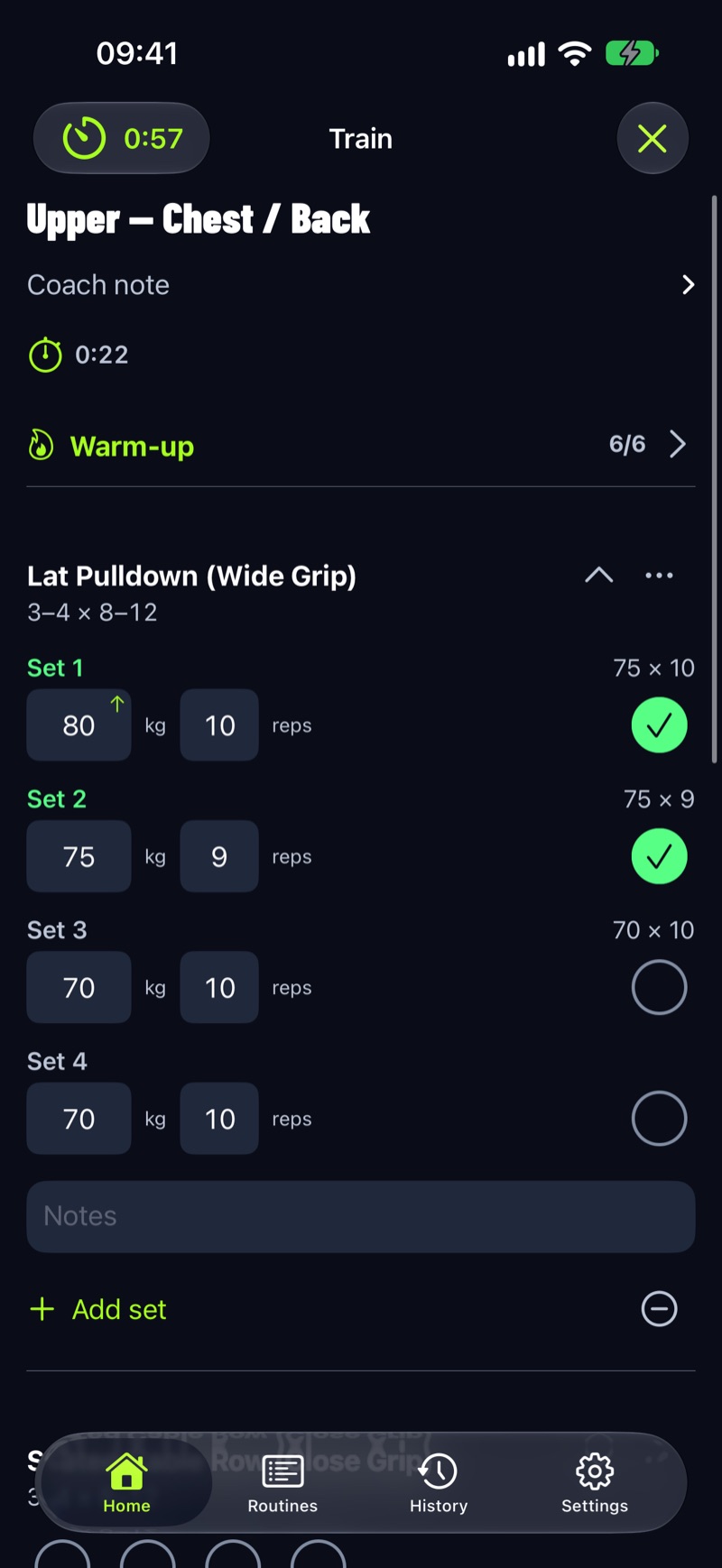
It has no account and needs no signal. Your history exports as CSV, and a full JSON backup restores everything, including on a new phone. Optional sync and backup use your own iCloud. The iPhone app sends anonymous usage analytics you can switch off; your workouts are not part of it.
Pricing comes straight from the store: LiftLoggr is free today. LiftLoggr Pro arrives with the December update, and everyone who installs before then keeps the whole app free for good. Export and backup restore are never behind a paywall.
Where LiftLoggr is not the best pick:
- No social feed, no web app, and no Wear OS until the Android release. Hevy wins.
- No phone-free Watch workouts. LiftLoggr’s Watch app is a companion; the iPhone runs the session. Strong and GymBook let the iPhone stay behind.
- No adaptive programming. LiftLoggr ships PPL, upper/lower and full-body starter splits, imports routine templates, and has a Siri/Shortcuts action that generates a fixed template routine, but it won’t build or adapt a multi-week plan around you. Alpha Progression, Fitbod and Boostcamp do.
- No video demos. Exercise instructions are text.
- Not on Android yet. It’s coming to Google Play in early 2027. Today, Hevy, Strong, Liftosaur or RepCount.
- No importer for other apps’ data. LiftLoggr imports its own backups, routine templates and custom exercises, not Strong or Hevy files.
Stay with your current app if…
- Hevy: you train with friends in the feed, or you log from a browser or a Wear OS watch.
- Strong: you leave your phone in the locker and log on the Watch, or you have years of Strong history you don’t want to move.
- Liftosaur: your program is a script, and the script is the point.
- Alpha Progression, Fitbod or Boostcamp: you want the app to choose the plan or the weights.
- GymBook or GymLogger X: a “Data Not Collected” label is your line. LiftLoggr’s label declares anonymous usage data, not linked to you.
If none of those is you, and you want a fast, private log with real backups, try LiftLoggr. More options without a subscription are in workout apps without a subscription; Watch-specific picks are in best Apple Watch weightlifting apps.
How we checked
On 2026-11-14 we read each app’s US App Store listing (apps.apple.com/us/app/id<ID>): description, compatibility (for watchOS), in-app purchases and the App Privacy section. Account, offline and export claims come only from the developer’s own listing, website or help centre, quoted where it matters. Where the developer doesn’t say, we wrote “not stated” or “not checked” instead of guessing. No review or rating scores are used. Spot a change? Use the contact page.
Questions
What is the best workout tracker app in 2026?
There isn't one winner. For a social feed and the most platforms, Hevy. For Watch-only workouts, Strong. For programs you script and full backups, Liftosaur. For set-by-set recommendations, Alpha Progression. For no account, offline use and restorable backups on iPhone, LiftLoggr, which is our app.
Which workout tracker doesn't need an account?
From first-party statements checked on 2026-11-14: Alpha Progression ('No account required'), Liftosaur (account optional), GymLogger X and LiftLoggr. GymBook mentions no account and declares Data Not Collected. Strong prompts every user to sign up.
Which workout tracker apps work on Android?
Of this list, Hevy, Strong, Liftosaur and RepCount state Android support. LiftLoggr's Android app is coming to Google Play in early 2027.
Which tracker is best for exporting my data?
Liftosaur and LiftLoggr both export a full JSON backup you can restore, plus a CSV history. Strong exports CSV that it can't import back. GymBook's export is a paid feature.
Did you test these apps?
No. Every fact comes from the app's App Store listing, website or help centre, read on 2026-11-14, with the link in the table. We say 'not checked' where we found no first-party statement.
Sources
- Strong Help Center: Why do I need a Strong account? help.strongapp.io
- Strong Help Center: What is Strong PRO? help.strongapp.io
- Strong Help Center: Can I export my workout data? help.strongapp.io
- Hevy Help Center: features guide, free vs Pro, platforms help.hevyapp.com
- Hevy Help Center: Login options explained help.hevyapp.com
- Hevy Help Center: Import Strong CSV files and export your data help.hevyapp.com
- Liftosaur: Features liftosaur.com
- Liftosaur: Sync and offline liftosaur.com
- Liftosaur: Import and export liftosaur.com
- GymBook: features and GymBook Pro gymbookapp.com
- Lagerland Apps: GymLogger X vs Strong lagerland.app
- Apple: App privacy details (label definitions) developer.apple.com