
Key takeaways
- 01Want your Hevy history to come with you? Liftosaur reads Hevy's CSV directly; GymLogger X Pro maps any CSV.
- 02Want no account? Liftosaur, GymLogger X, GymBook, FitNotes and LiftLoggr all work without one.
- 03Want a free tier with fewer caps? StrengthLog logs unlimited workouts and custom exercises for free.
- 04Stay with Hevy for the feed, the web app and Wear OS.
On this page
The best Hevy alternative depends on why you’re leaving: Liftosaur if you want your Hevy history to come with you and no account required, StrengthLog if you want a bigger free tier, and GymLogger X, GymBook or LiftLoggr if you want an iPhone log with no account at all. If the feed, the web app or Wear OS is why you use Hevy, stay.
LiftLoggr is our app, and it’s one of the seven below. It isn’t the right answer to every reason, and the table says where it isn’t. Every fact about other apps comes from their App Store listings (US storefront), help centres or websites, checked 2026-11-14. We read the listings and documentation; we did not run a long-term test of each app.
Why people look for a Hevy alternative
Hevy is a good logger. The reasons to leave are about the model around it, and Hevy’s own help centre documents each one.
- Your log lives on Hevy’s servers. “Your information on Hevy is stored to your profile on our servers, not to your device.” Only an unsaved workout stays on the phone. No account, no Hevy.
- Profiles start public. “By default, Hevy accounts are public.” You can go private and hide suggested users, but “there is no option to remove the Discover feature.”
- The free tier has three caps. Up to 4 routines, up to 7 custom exercises, 3 months of workout and stats history. The warm-up calculator and Hevy Trainer are Pro only.
- The export is one-way. Hevy writes a CSV of workouts or measurements, but it “only allows you to import CSVs from the Strong app.” A Hevy export can’t be restored into Hevy, so it isn’t a backup in the restore-it-later sense.
Name your reason, then use this table.
| Your reason | Look first at | Also fits | Doesn’t fit |
|---|---|---|---|
| Bring my Hevy history with me | Liftosaur | GymLogger X Pro (manual column mapping) | Strong, GymBook, StrengthLog (not stated), LiftLoggr |
| No account, data on my device | LiftLoggr, GymLogger X | Liftosaur (account optional), GymBook, FitNotes on Android | Strong |
| An export I can restore | Liftosaur, LiftLoggr | GymBook Pro, FitNotes | Strong, GymLogger X |
| A free tier with fewer caps | StrengthLog | Liftosaur, FitNotes | Strong (3 routines) |
| No feed, no followers | Strong, GymBook | LiftLoggr, GymLogger X, FitNotes | StrengthLog (friends and challenges) |
| I’m on Android | FitNotes, Liftosaur | StrengthLog, Strong | GymLogger X, GymBook, LiftLoggr (Android early 2027) |
The 7 alternatives, with honest fit
1. Liftosaur: the one that takes your Hevy CSV
Liftosaur’s import screen has a row called Upload CSV file from Hevy. It maps Hevy names (“Bench Press (Barbell)” becomes Bench Press with a barbell), brings warm-up sets, kg or lb and exercise notes, shows a preview with duplicates skipped, and lets you undo the last 5 imports. Its own exports go both ways: a JSON file it calls “the only export that you can load back into the app in full”, a CSV it can re-import, and every program as text.
It also works without an account. “You can use the app without an account and without a connection.” An account only adds a cloud copy across iOS, Android and the web app.
- Fits if: you want your Hevy years intact, you’re on Android or want a browser app, or you like writing progression rules. Liftosaur programs are written in its Liftoscript language, with GZCLP, 5/3/1 and others built in.
- Falls short if: you want a plug-and-play Apple Watch app or charts for free. Premium (US$4.99 a month, US$39.99 a year, US$99.99 one-time on the US App Store) unlocks the Watch app, graphs, the plates calculator and rest-timer notifications with the Live Activity. Its privacy label lists Health & Fitness, email and identifiers as data linked to you.
2. Strong: the quieter account-based logger
Strong is what many Hevy users came from. No feed, no likes: share links are the only social part. Its Apple Watch app logs “with or without your iPhone”.
- Fits if: the public profile and Discover feed are what bother you, and you’re fine with an account.
- Falls short if: the account is the problem (“All users will be prompted to sign up”), or you want to take your Hevy log with you: Strong has no import. The free tier stops at 3 custom routines; PRO is US$4.99 a month, US$29.99 a year or US$99.99 PRO Forever on the US App Store. Full head-to-head: Strong vs Hevy.
3. StrengthLog: the bigger free tier
StrengthLog’s listing calls itself “the world’s most generous workout tracker”, and the free list backs it up: unlimited workouts, unlimited custom exercises, 600+ exercises with instructions and video, ready-made programs, your own routines with linear progression, a rest timer and a plate calculator. It runs on iPhone, iPad, Apple Watch and Android.
- Fits if: Hevy’s 4-routine and 7-custom-exercise caps are your reason, and you like starting from ready-made programs.
- Falls short if: you want double progression or RIR logging for free: both are Premium. Premium comes in 1, 3 and 12-month terms (the US listing shows US$16.90, US$37.90 and US$109.00). It has friends, challenges and Strength Level comparisons, with “your full training log” kept private. Its label lists email, name and user ID linked to you. We couldn’t confirm an export format from the listing, so check before you commit years of data.
4. GymLogger X: no account, programs included
GymLogger X is a solo-developer iPhone and Apple Watch logger: “There are no ads, and there is no account to make.” Its App Store privacy label reads Data Not Collected. It ships 44 ready-made programs (6 free) and a Smart Program Creator, with a rep range and RIR target per exercise. Pro is US$1.99 a month, US$17.99 a year or US$39.99 one-time on the US App Store, with Family Sharing.
- Fits if: you want no account and a program to follow, and you’ll pay for Pro to bring history in: its importer reads CSV, TSV or TXT, lets you map columns and matches exercise names with a review step. There’s no Hevy preset, so plan on mapping columns once.
- Falls short if: you want your data out again. Its developer’s comparison page says there’s no CSV export of every set; finished workouts go to Apple Health. The free tier keeps 3 templates and the last 30 days of history. The Watch app needs the iPhone to start a workout.
5. GymBook: a long-running iPhone log that collects nothing
GymBook has been on the App Store since 2013 (its copyright line) and also reads Data Not Collected. Its site: “your workout data stays with you, not with us.” The Watch app logs “whilst keeping your iPhone in your pocket or even at home.”
- Fits if: you want a calm, no-account iPhone and Watch log and you’ll pay once. GymBook Pro is US$22.99 one-time (or US$1.99 a month, US$8.99 a year) on the US App Store.
- Falls short if: you want export on the free tier. Export to CSV and XML, the database backup that “can easily be imported back”, and iCloud backup are all listed under Pro. The free library is 50+ exercises (400+ with a paid pack). It can’t read a Hevy CSV, and there’s no Android version.
6. FitNotes: the Android answer
If you’re on Android, FitNotes is the classic no-account log: “Free to use, and no ads - ever.” Google Play’s data-safety section says no data collected. You save a backup file to the phone, Dropbox or Google Drive, or turn on automatic Google Drive backups of the last 5 versions. The CSV export is for spreadsheets; FitNotes says “It is not possible to restore data from the CSV file - please use the Backup option for this.”
- Fits if: you’re on Android, you want a free log with real backups and you don’t need a watch.
- Falls short if: you’re on iPhone. FitNotes is Android-only; see FitNotes for iPhone for the closest iOS options.
7. LiftLoggr: no account, export that restores
LiftLoggr is our app. It suits the lifter who left Hevy over reasons 1, 2 and 4, not reason “I want my history imported”.
- No account and no LiftLoggr server. Workouts stay on your iPhone; optional sync goes to your own iCloud.
- An export that comes back. A full JSON backup restores with merge or replace. The history CSV has one row per set for spreadsheets.
- The logging loop Hevy users expect: last time’s weight and reps beside each set, pre-filled next weights from double progression, warm-ups built from your first working set, drop sets, supersets, RIR, and an auto rest timer on the Lock Screen, Dynamic Island and Apple Watch.
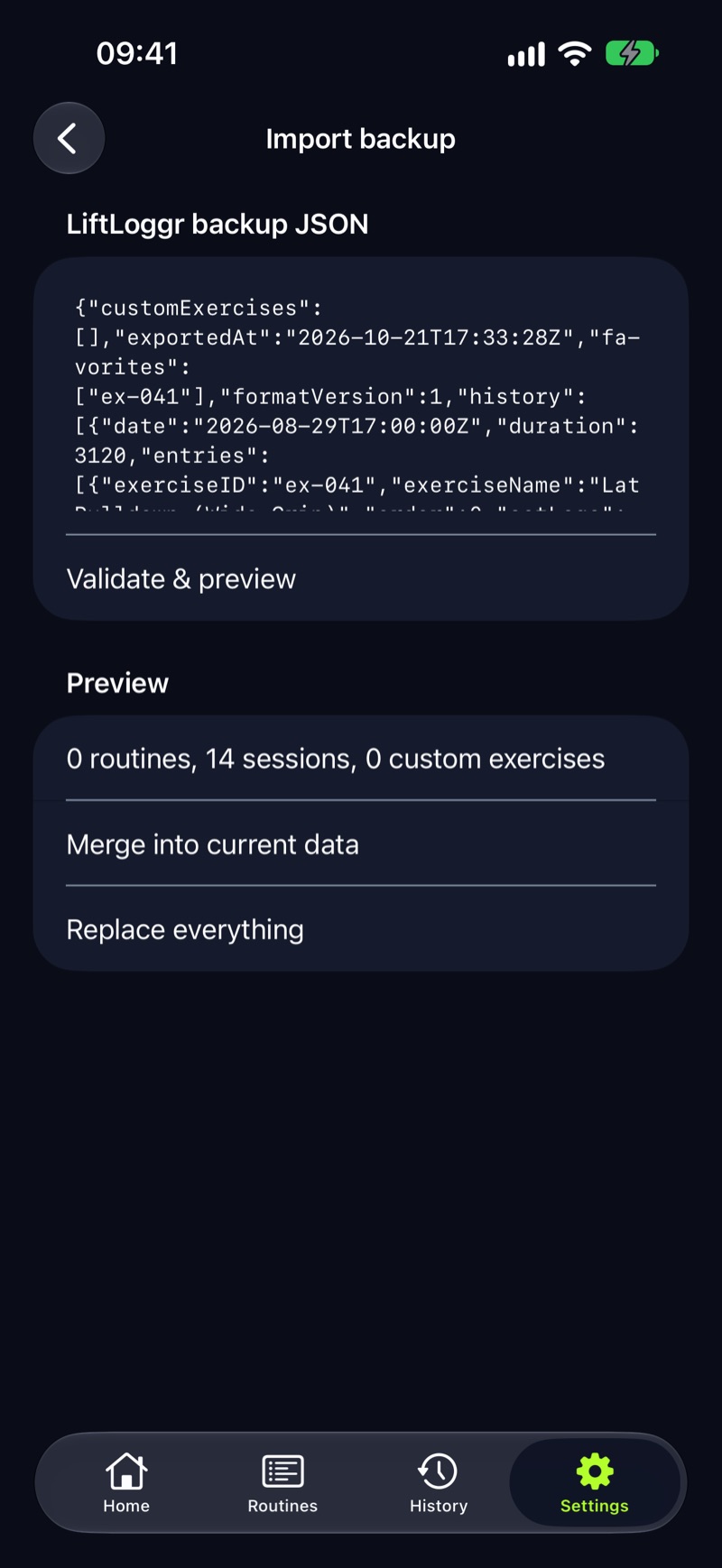
- Falls short if: you want your Hevy history inside the app. LiftLoggr has no CSV import of any kind, so your Hevy file stays a spreadsheet. Also no feed, no web app, no Android until early 2027, and the Watch app is a companion that needs the iPhone app.
Stay with Hevy if…
- The feed is the point. Hevy’s follows, comments, leaderboards and gym profiles go well beyond the sharing options in the no-account apps above.
- You plan on a computer. Hevy runs in a web browser. Liftosaur also does; the iPhone-only apps here don’t.
- You wear a Wear OS watch today. Hevy supports Apple Watch and Wear OS on its free tier.
- You want a guided plan inside the logger: Hevy Trainer builds one from your goal and equipment (Pro).
- You want an API. Hevy Pro includes one for your own dashboards.
Before you switch
- Export from Hevy: Profile → Settings → Export & Import Data → Export Data → Export Workouts. Do measurements separately.
- Keep the CSV even if your new app can’t read it. A spreadsheet of your old PRs is still a logbook.
- Make one backup in the new app on day one, and restore it once, so you know it works.
More on keeping your training data portable: how to export workout data. If the account is the whole issue, see the offline workout tracker page for what LiftLoggr keeps on the phone.
Questions
Which Hevy alternative can read my Hevy export?
Liftosaur has a dedicated Upload CSV file from Hevy option that maps Hevy's exercise names and shows a preview with undo. GymLogger X Pro reads CSV files with a column-mapping step and no Hevy preset. LiftLoggr, Strong and GymBook can't read a Hevy CSV.
Is there a Hevy alternative with no account?
Yes. Liftosaur works without an account and adds one only for cloud sync. GymLogger X and LiftLoggr have no account at all, GymBook mentions none, and FitNotes on Android stores everything on the phone.
Is there a free Hevy alternative with more routines?
StrengthLog logs unlimited workouts and custom exercises for free and lets you build your own routines with linear progression. Liftosaur's free tier covers programs, logging, history and import and export; its Premium adds graphs and the Apple Watch app.
Can I make Hevy private instead of switching?
Partly. Hevy lets you set a private profile, hide suggested users and make every workout private by default. The Discover feed stays on the home screen; Hevy says there's no option to remove it. Your data still lives on Hevy's servers.
Will I lose my Hevy routines if I stop paying for Pro?
No. Hevy keeps routines and custom exercises above the free limits; you just can't create new ones. Stats beyond 3 months stay on its servers and come back if you resubscribe.
Sources
- Hevy help: 2026 features guide (free vs Pro, devices) help.hevyapp.com
- Hevy help: where your information is stored help.hevyapp.com
- Hevy help: keeping your information private help.hevyapp.com
- Hevy help: importing Strong CSV files and exporting your data help.hevyapp.com
- Hevy, US App Store listing apps.apple.com
- Liftosaur: Import and Export liftosaur.com
- Liftosaur: Sync and Offline liftosaur.com
- Liftosaur: Premium liftosaur.com
- Liftosaur, US App Store listing apps.apple.com
- Strong help: Why do I need a Strong account? help.strongapp.io
- Strong, US App Store listing apps.apple.com
- StrengthLog, US App Store listing apps.apple.com
- GymLogger X, US App Store listing apps.apple.com
- Lagerland Apps: GymLogger X vs Strong lagerland.app
- GymBook, US App Store listing apps.apple.com
- GymBook website gymbookapp.com
- FitNotes, Google Play listing play.google.com
- FitNotes help: Settings (backup, restore, export) fitnotesapp.com