Key takeaways
- 01Check sets, change weight and reps, and run rest from the wrist.
- 02Last session's numbers sit under every target.
- 03The watch measures heart rate and calories and writes the workout to Apple Health once.
- 04It's a companion: the iPhone app keeps the workout and your history.
On this page
Yes, you can log weight lifting on an Apple Watch: LiftLoggr’s watch companion shows the current lift, its target weight × reps and last session’s numbers, and one tap checks the set. The rest timer then counts down on the wrist and taps you when it’s time to go.
Apple’s own Workout app records time, heart rate and calories for strength training, but not what was on the bar. LiftLoggr records both. The full background is in how to track weightlifting on Apple Watch.
What you can do from the wrist
| On the watch | How |
|---|---|
| See the current exercise and its set circles | Now page, first screen of a workout |
| Check a set at the target | Check set |
| Change weight or reps first | Tap the target, turn the Digital Crown, Save & check |
| See last session | “Last: 57.5 kg × 8” under the target |
| Rest | Automatic after a check; +30s or Skip |
| Start today’s routine | TODAY → Start |
| Pause, end and save | Swipe to the controls: Pause, End → Save & finish |
| Water Lock | Controls page |
| Heart rate, calories, sets, volume | Metrics page |
Proof, screen by screen
1. The next set, in one glance
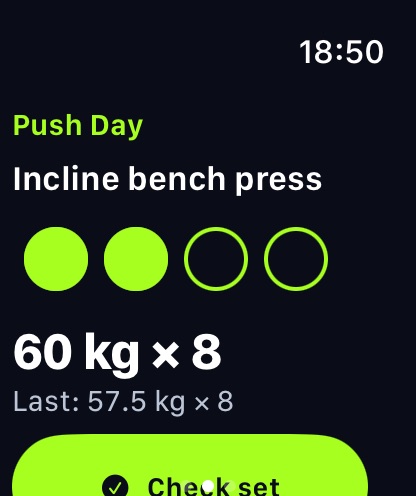
The Now page answers one question: what do I do right now? Exercise, set circles, target in big numbers, last session underneath.
2. Crown editing when the plan changes
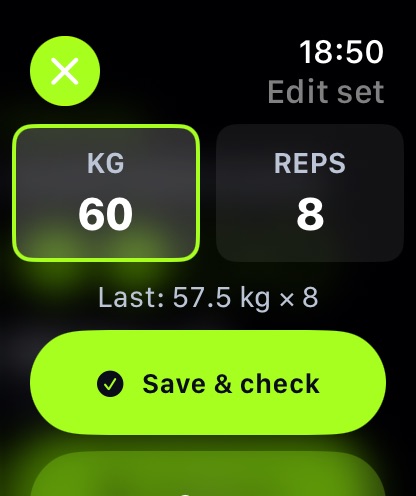
Got one rep fewer? Tap the target, pick REPS, turn the Crown, Save & check. The change lands in the iPhone log immediately.
3. Rest that taps your wrist
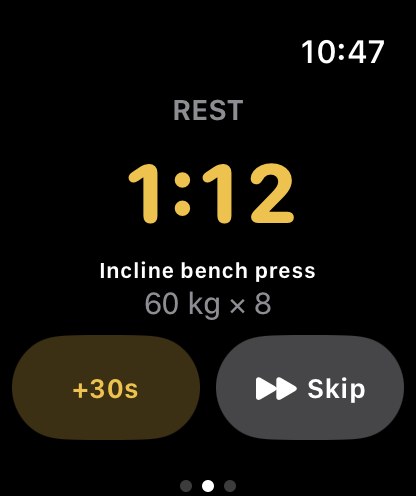
When you check a set, the same rest timer as the phone takes over the watch: countdown, next set, +30s, Skip, and a haptic when it ends.
4. Live metrics and a real summary
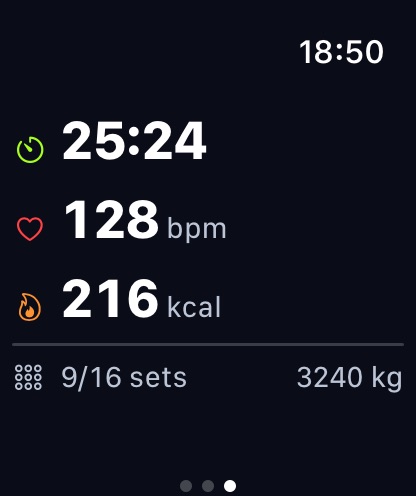
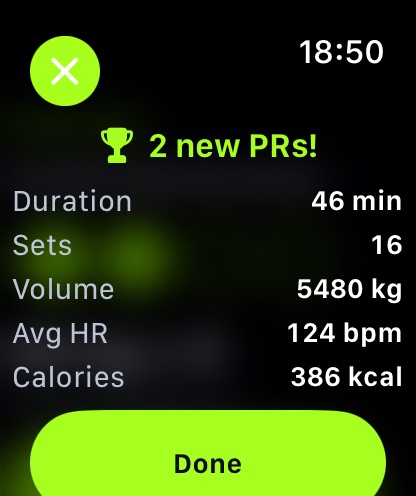
End → Save & finish saves the session on your iPhone and shows the summary: new PRs, duration, sets, volume, average heart rate and calories.
5. Apple Health
The watch runs a Traditional Strength Training session while you lift, so heart rate and active calories are measured, not guessed. There is one writer per workout: by default the watch saves it to Apple Health; with Settings → My data → Save workouts to Health on, the iPhone saves it with LiftLoggr’s sets, reps, volume and records attached, and the watch discards its copy.
Needs the iPhone
This is a companion app. The iPhone keeps the workout, your routines and your history; the watch mirrors the live session and sends each check back. Set checks made while the phone is briefly out of reach are queued and land when it reconnects. No internet is involved at any point.
Requirements: iPhone with iOS 26 or later and Apple Watch with watchOS 26 or later. Setup steps: Apple Watch setup.
What it doesn’t do
You can’t build or edit routines on the watch, browse history there, or leave the iPhone at home. There’s no cardio or HIIT tracking. A Wear OS companion ships with the Android app, coming to Google Play in early 2027.
Questions
Can I log weight lifting on Apple Watch with LiftLoggr?
Yes. Start a workout and the watch shows the current exercise, its set circles and the target weight × reps. Tap Check set, or tap the target to change weight and reps with the Digital Crown, then Save & check.
Does the LiftLoggr watch app work without my iPhone?
No. The watch mirrors the workout running on your iPhone and sends each check back to it, so keep the phone in the gym with you. It doesn't need internet; the two talk directly.
Does it save to Apple Health and the Activity rings?
Yes. A workout run with the watch is saved as Traditional Strength Training with the heart rate and active calories it measured. If you turn on Settings → My data → Save workouts to Health on iPhone, the iPhone writes the workout instead, with LiftLoggr's sets, reps, volume and records as metadata, and the watch drops its copy so nothing counts twice.
Which Apple Watch do I need?
Any Apple Watch that runs watchOS 26 or later, paired with an iPhone running iOS 26 or later.
Does the built-in Workout app track sets and reps?
The built-in Workout app's Traditional Strength Training records time, heart rate and calories, not the weight or reps of each set. That is the gap LiftLoggr fills.