Key takeaways
- 01The built-in Workout app records duration, heart rate and calories for a lifting session.
- 02It has no fields for exercise, weight, sets or reps.
- 03Use Traditional Strength Training for barbell, dumbbell and machine work.
- 04To log the lifts themselves, pair the watch with a logging app.
On this page
Yes and no. The Apple Watch tracks a weight-lifting session as a workout, recording its duration, heart rate and active calories, but the built-in Workout app does not record what you lifted: no exercises, no weights, no sets and no reps.
To log the lifting itself on your wrist, you need a logging app that runs on the watch, or (for Apple Fitness+ subscribers following one of its plans) Apple’s new Gym Strength feature described below.
What the Workout app records for strength training
Apple’s Workout app lists two strength types: Traditional Strength Training and Functional Strength Training (Apple, Workout types). During any workout, raising your wrist shows elapsed time, calories burned and heart rate, plus distance and pace for workouts that move (Apple, Start a workout).
| Data | Workout app (strength) | Notes |
|---|---|---|
| Duration | Yes | Start to end, including rest |
| Heart rate | Yes | Live and average |
| Active calories | Yes | Estimated |
| Effort rating (1–10) | You rate it | Apple estimates effort for cardio-focused workouts; edit or add it in the summary |
| Training load | Yes | Built from the intensity and duration of the last 7 days vs the previous 28 (Apple) |
| Exercise names | No | |
| Weight per set | No | |
| Sets and reps | No | |
| Progression, PRs, estimated 1RM | No |
Checked against Apple’s support pages on 2026-11-14.
That makes the Workout app a good heart-rate and calorie logger for a gym session and nothing more. You can’t look back and see that you benched 80 kg × 8 last Tuesday.
Traditional or Functional?
| Your session | Pick |
|---|---|
| Barbell, dumbbell and machine lifts with rest between sets | Traditional Strength Training |
| Circuits, kettlebell flows, bodyweight work, little rest | Functional Strength Training |
| A class that mixes lifting and cardio intervals | Functional Strength Training or High Intensity Interval Training |
Apple doesn’t publish how the two types differ in their calorie estimates. LiftLoggr saves its sessions to Apple Health as Traditional Strength Training.
Apple Fitness+ Gym Strength
On 3 November 2026 Apple announced Gym Strength for Apple Fitness+: four-week plans with exercises, sets, reps and load, which adapt each week to what you logged. With watchOS 27.3 on the watch, you can view the exercises and log reps and weight from the wrist (9to5Mac).
Three limits, as of 2026-11-14:
- It’s in beta. It needs iOS 27.3 on the iPhone; the watch part needs watchOS 27.3.
- It needs a Fitness+ subscription.
- It logs inside Apple’s plans. It isn’t a general logbook for a program you run yourself.
The announcement covers Gym Strength only; it doesn’t change what the Workout app’s own strength workouts record.
Three ways to track lifting with an Apple Watch
| Workout app only | Workout app + notebook | Logging app with a watch companion | |
|---|---|---|---|
| Heart rate and calories | Yes | Yes | Yes |
| Exercise, weight, sets, reps | No | On paper | Yes, on the wrist |
| Last time’s numbers | No | Flip back a page | Beside each set |
| Rest timer | Separate Timer app | Separate Timer app | Starts when you check a set |
| Apple Health workout | Yes | Yes | Yes |
| Cost of effort mid-set | None | Pen, paper, both hands | One tap |
If you just want rings, the Workout app is enough. If you want progressive overload, you need the numbers: see how to track progressive overload. For a side-by-side of watch apps, read best Apple Watch weightlifting apps.
How LiftLoggr works on the Apple Watch
LiftLoggr’s Apple Watch app is a companion to the iPhone app. The workout lives on your iPhone; the watch mirrors it and sends your taps back. It needs the iPhone app and the phone nearby, but no internet connection and no account.
Now page: what to do right now. The current exercise, a circle per set, the target weight × reps, last time’s set for comparison (“Last: 57.5 kg × 8”), and for barbell lifts the plates per side. Tap Check set to complete it.
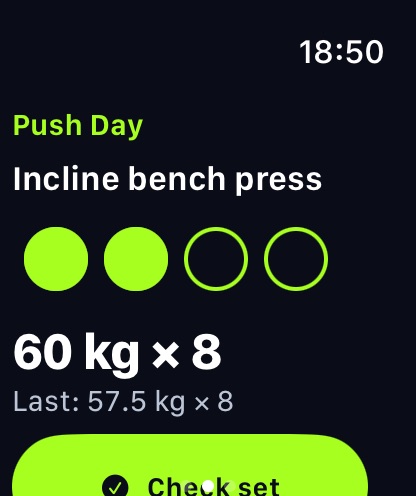
Edit with the Digital Crown. Tap the weight × reps line to open the editor, then turn the Crown to change weight (0.5 steps) or reps, and save and check in one tap.
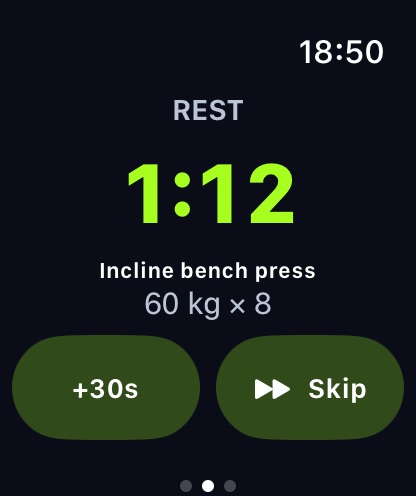
Rest owns the screen. When you check a set, the rest timer starts on the phone and the watch switches to the countdown, with the next exercise and its weight × reps underneath so you can load the bar. +30s and Skip are one tap each. The watch taps your wrist when rest ends, which you’ll notice in a loud gym. Rest lengths follow the rest timer rules: remembered per exercise, after the round in a superset.
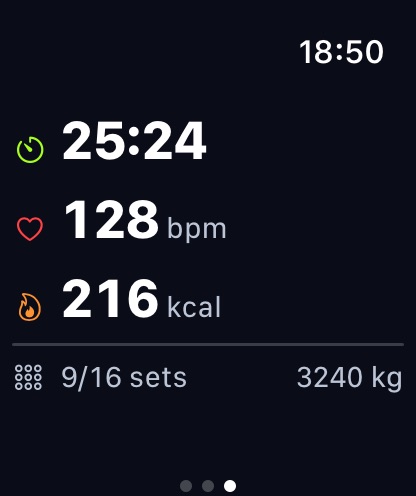
Metrics page. Elapsed time, live heart rate and active calories from the watch’s own strength-training workout session, plus sets done out of planned and session volume.
Controls page. End and save (the session is saved on your iPhone, and the watch shows a summary), pause, and Water Lock.
Before you start. If today has a scheduled routine, the watch shows it with a Start button that loads it on the iPhone. Watch-face complications show the session at a glance.
Edge cases
- Phone out of range. Set checks and edits made while the watch can’t reach the iPhone are queued and land when it reconnects. Starting today’s routine from the watch needs the phone reachable.
- Apple Health. One session becomes one Traditional Strength Training workout in Apple Health, not two. With Health logging on in LiftLoggr, the iPhone writes it; otherwise the watch saves its own workout with heart rate and calories.
- Warm-up sets show as their own count on the watch and don’t progress, same as on the phone.
- Units. The watch uses your iPhone setting, kg or lb.
Set it up
- Install LiftLoggr on your iPhone, then add the watch app from the Watch app on your iPhone or the App Store on the watch.
- On the iPhone, allow Apple Health access if you want workouts saved there.
- Start a workout on the iPhone, or tap Start on the watch for today’s routine.
- Leave the phone on the bench. Log from the wrist.
For what to do with the rest periods the watch is timing, read how long to rest between sets. For the product page, see Apple Watch workout tracker.
Questions
Does Apple Watch count reps when lifting weights?
Not in the built-in Workout app. A Traditional Strength Training workout records time, heart rate and calories; there's no rep, set or weight field. Logging apps add those.
Should I use Traditional or Functional Strength Training on Apple Watch?
Traditional Strength Training for barbells, dumbbells and machines; Functional Strength Training for circuits and bodyweight work. Apple lists both but doesn't publish how their calorie estimates differ.
Are Apple Watch calories accurate for weight lifting?
Treat them as a rough estimate. Heart rate during lifting rises and falls with each set and rest, which is harder to turn into calories than steady cardio. Use them for trends, not exact numbers.
Can I log sets and reps on Apple Watch without my iPhone?
With LiftLoggr, the workout lives on the iPhone and the watch mirrors it, so the phone needs to be with you. Set checks and edits made out of range are queued and land when the watch reconnects.
Do I need to start the Workout app as well as LiftLoggr?
No. LiftLoggr runs its own strength-training workout session on the watch for heart rate and calories while you log, and saves one workout to Apple Health at the end. Running both at once can record the session twice.
Sources
- Apple Support: Workout types on Apple Watch (checked 2026-11-14) support.apple.com
- Apple Support: Start a workout on Apple Watch (checked 2026-11-14) support.apple.com
- Apple Watch User Guide: Track your training load (checked 2026-11-14) support.apple.com
- 9to5Mac, 3 Nov 2026: Apple announces Fitness+ Gym Strength program (checked 2026-11-14) 9to5mac.com