
Key takeaways
- 01Free tier: Strong caps you at 3 routines; Hevy at 4 routines, 7 custom exercises and 3 months of stats.
- 02Strong's Watch app logs with or without the iPhone. Hevy adds Wear OS, a web app and a social feed.
- 03Hevy imports a Strong CSV. Strong can't import any CSV, its own included.
- 04Both need an account and keep your history on their servers.
On this page
Strong is the quieter logger with a Watch app that works with or without the iPhone; Hevy is the bigger free tier with a social feed, a web app and Wear OS. If your history is already in Strong, Hevy can take it; nothing can go the other way.
LiftLoggr is our app, and it comes up at the end as a third option. Everything about Strong and Hevy below comes from their App Store listings (US storefront), help centres and websites, checked on 2026-11-14. We read the listings and documentation; we did not run a month-long test of either app, and we say so where a point depends on it.
Strong vs Hevy at a glance
| Strong | Hevy | |
|---|---|---|
| Free tier limit | Unlimited workouts, 3 custom routines | 4 routines, 7 custom exercises, 3 months of workout and stats history |
| Paid plans (US App Store) | US$4.99 a month, US$29.99 a year, US$99.99 PRO Forever | US$2.99 a month, US$23.99 a year, US$74.99 one-time |
| Platforms | iPhone, Android, Apple Watch | iPhone, Android, web browser, Apple Watch, Wear OS |
| Apple Watch | “Log workouts with or without your iPhone” | “Finish your workout without touching your phone”; saves when the watch reconnects |
| Social | Share links for workouts and templates | Follow people, feed, comments, likes, leaderboards, gym profiles |
| Account | Every user is prompted to sign up | Data lives on Hevy’s servers under your profile |
| Export | CSV, spreadsheet-friendly | CSV of workouts or of measurements |
| Import | None: exported files “cannot be imported back into Strong” | Strong CSV only (English, kg) |
| Offline | Not stated | “Work out offline”, syncs later |
| Ads | “No ads, ever” (help centre) | “Free, with no ads” |
| App languages | English + 10 | English + 15 |
Two rows decide it for most people: the free-tier limit and the data row. The rest is taste.
Pricing and what the free tiers really cap
Strong
Strong’s listing: “The free version of Strong can save unlimited workouts, but is limited to 3 custom routines.” The same description prices PRO at US$4.99 a month or US$29.99 a year. The in-app purchase list adds Strong PRO Forever at US$99.99, plus entries the description doesn’t explain (6 months at US$19.99, a year at US$23.99, a Forever entry at US$79.99).
Strong’s help centre lists what PRO adds: unlimited workout templates, body part measurements, all charts, the plate calculator, the warm-up calculator, custom icons and themes. It also promises that “your workout data will always be available whether you are a Strong PRO user or not.”
Hevy
Hevy’s App Store purchases: Pro monthly US$2.99 (a second monthly entry, at US$3.99, is also listed), yearly US$23.99, lifetime US$74.99. Its 2026 features guide sets the free limits: up to 4 routines, up to 7 custom exercises, 3 months of workout and stats history. The warm-up calculator and Hevy Trainer, its guided program builder, are Pro only.
Drop from Pro to free and Hevy keeps the routines and custom exercises you already made; you just can’t create more. Older stats stay on Hevy’s servers and return if you resubscribe.
What that means for a real split
| Your plan | Routines needed | Strong free | Hevy free |
|---|---|---|---|
| Full body, 3 days, one session | 1 | Fits | Fits |
| Push / pull / legs, run once a week | 3 | Fits | Fits |
| Upper / lower with A and B days | 4 | Paid | Fits |
| Push / pull / legs ×2 with different A and B days | 6 | Paid | Paid |
| Any plan you’ve run for more than 3 months, if you want long-range charts | n/a | Charts are a PRO item | History view capped at 3 months |
Lifetime vs yearly, in plain numbers
| Strong | Hevy | |
|---|---|---|
| 1 year | US$29.99 | US$23.99 |
| 3 years | US$89.97 | US$71.97 |
| Lifetime | US$99.99 | US$74.99 |
| Lifetime pays for itself after | about 3.3 years | about 3.1 years |
US prices, checked 2026-11-14. Your storefront will differ.
Apple Watch and other devices
Strong sells its Watch app on one line: “Fully-featured Apple Watch app to log workouts with or without your iPhone.” Its help centre adds Live Sync (the same workout on wrist and phone at once), Handoff between devices, and heart rate and calories during the session. It also admits “not all features of Strong are available on Apple Watch.” Strong’s site lists iPhone, Android and Apple Watch; its Play listing doesn’t mention Wear OS.
Hevy covers more devices: iPhone, Android, a web browser, Apple Watch and Wear OS, all on the free tier. On Apple Watch you can log sets, start rest timers and finish the workout without touching the phone. The listing adds that workouts “save automatically when your watch reconnects to your phone”, so plan on the phone being part of the loop at some point.
If you train with the watch and leave the phone in the locker, Strong’s wording is the more direct promise. If you own a Wear OS watch or want to plan on a laptop, Hevy is the only one of the two that does it.
Social features
Strong has none to speak of. You can share a workout or a template by link, and that’s it.
Hevy is half logbook, half network. You follow friends and athletes, see their workouts in a feed, comment, like, compare lifts on leaderboards, and, since version 3.2.5, see your gym’s feed. Hevy’s help centre is upfront about the default: “By default, Hevy accounts are public.” You can make the profile private, hide suggested users and set every workout to private, but “there is no option to remove the Discover feature.”
Getting your data out, and back in
This is where the two apps differ most, and where the order of a move matters.
| Move | Works? | Source |
|---|---|---|
| Strong → spreadsheet | Yes, CSV | Strong help centre |
| Strong → Strong (restore a CSV) | No | “exported files cannot be imported back into Strong” |
| Strong → Hevy | Yes, if the file is a direct Strong export in English and in kg | Hevy help centre |
| Hevy → spreadsheet | Yes, CSV of workouts or measurements | Hevy help centre |
| Hevy → Hevy (restore a CSV) | No: Hevy “only allows you to import CSVs from the Strong app” | Hevy help centre |
| Hevy → Strong | No | Strong has no import |
Two practical notes. First, Hevy asks you to switch Strong to English before you export, not to translate the file afterwards. Second, if you need data in another format, Hevy support will send a sample CSV in the Strong format, but won’t troubleshoot files that didn’t come from Strong.
Hevy Pro also includes an API. With a key from the web settings you can pull workout history, routines and measurements, which suits people who keep their own dashboards.
Accounts, storage and privacy labels
Both apps are account-first.
- Strong: “All users will be prompted to sign up for an account before using Strong.” Sign-up is by email, Facebook or Sign in with Apple. Strong’s help centre warns iOS users who haven’t signed up not to delete the app, because their workouts aren’t yet in Strong’s cloud.
- Hevy: “Your information on Hevy is stored to your profile on our servers, not to your device.” Only unsaved workouts live on the phone.
Privacy labels are developer-reported and not verified by Apple. On the US listings:
| Strong | Hevy | |
|---|---|---|
| Data used to track you | None listed | None listed |
| Data linked to you | Health & Fitness, Purchases, Contact Info (email), Identifiers (user and device ID), Diagnostics, Other Data | Purchases, Contact Info (email, name), Contacts, Usage Data |
| Data not linked to you | None listed | Identifiers, Sensitive Info, Diagnostics |
Neither label lists data used to track you across other companies’ apps. Both tie your log to an account, which is how their sync works.
Pick Strong if…
- You want a plain logbook with no feed, no likes and no follower counts.
- You want to run whole sessions from the Apple Watch, iPhone optional.
- One fixed program covers you, so 3 routines on the free tier is enough.
- You value a long track record: Strong’s US listing carries 109K ratings, and its changelog shows steady releases through 2026.
Pick Hevy if…
- Training with friends, or seeing what your gym lifts, keeps you showing up.
- You use Android or Wear OS, or you want to plan on a computer.
- You need 4 routines without paying, or a free library of ready-made splits.
- You’re coming from Strong: the CSV import is built for exactly that.
- You want a lower price for paid features, on US prices.
A third option: no account at all
LiftLoggr is our app. It answers a different question: what if the log never leaves your phone unless you send it?
- No account. No sign-up, no email, no LiftLoggr server. Open it and log.
- Offline by design. Logging, the rest timer, the Live Activity and the Apple Watch companion run on the device. Optional sync goes to your own iCloud.
- Export you can restore. Settings → My data → Export data gives a history CSV (one row per set: date, routine, exercise, set, weight, unit, reps, warm-up, completed, note, set type, RIR, superset) and a full JSON backup. The backup goes back in with Import backup, merged into your current data or replacing it.
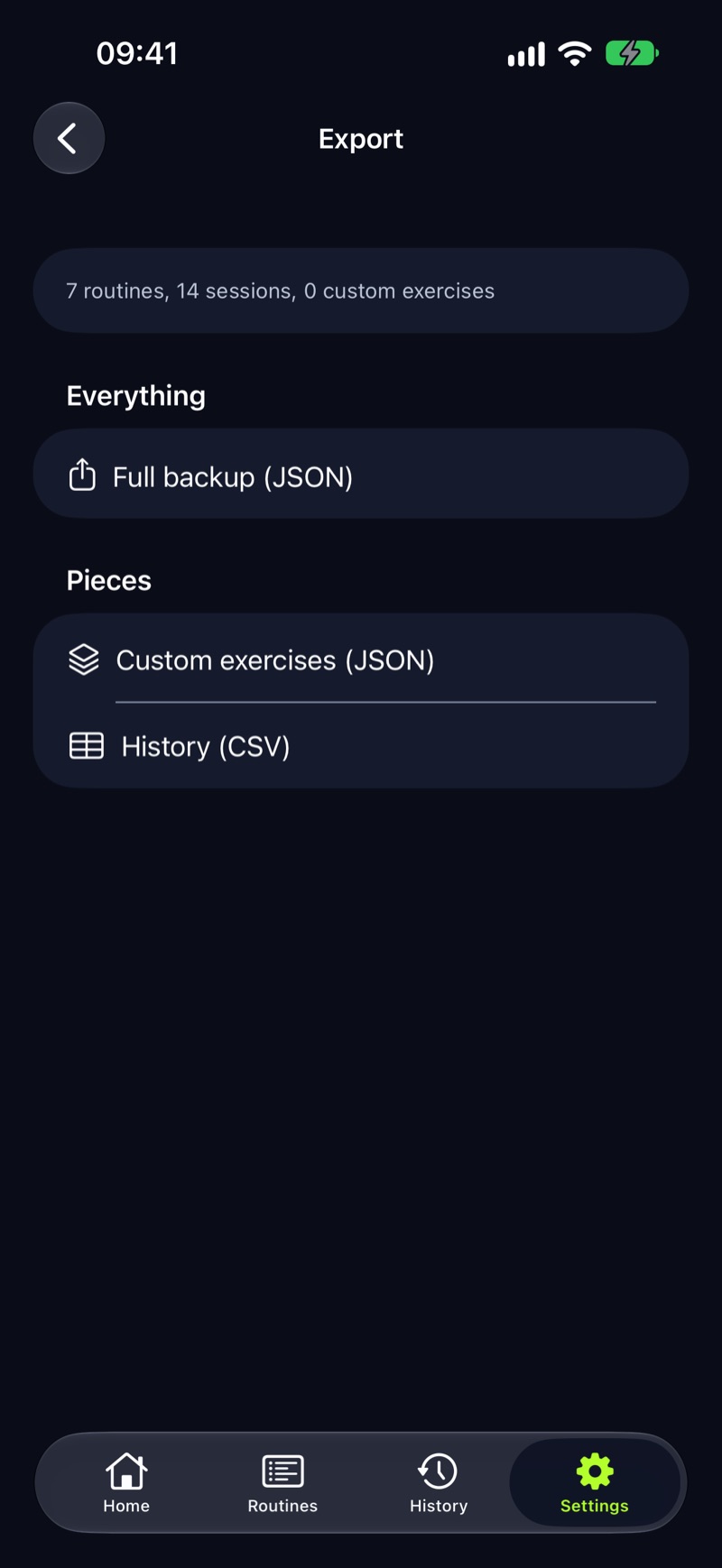
What it doesn’t do, plainly: no social feed, no web app, no Wear OS or Android until the Android app comes to Google Play in early 2027, and the Apple Watch app is a companion that needs the iPhone app. It has no CSV import, so your Strong or Hevy history stays in its CSV; keep that file in a spreadsheet and start a fresh log. The privacy label lists anonymous usage data, not linked to you; you can switch that off in Settings → My data.
LiftLoggr is free today. LiftLoggr Pro arrives with the December update, and everyone who installs before then keeps the whole app free for good.If the account is the sticking point for you, read Hevy alternatives and Strong alternatives for the full field, or how to export workout data before you move anything.
Questions
Is Strong or Hevy better for beginners?
Hevy's free tier is roomier: 4 routines and a free library of ready-made plans, against Strong's 3 routines. Strong is the quieter app, with no feed. If you train 3 days a week on one fixed plan, both free tiers are enough.
Can I move my Strong history into Hevy?
Yes. Hevy accepts a direct Strong CSV export, in English and in kilograms, under Profile → Settings → Export & Import Data → Import Data, then the Strong CSV option. The reverse doesn't work: Strong has no CSV import.
Which is cheaper, Strong PRO or Hevy Pro?
On the US App Store on 2026-11-14, Hevy Pro is US$23.99 a year or US$74.99 one-time; Strong PRO is US$29.99 a year or US$99.99 for PRO Forever. Prices vary by country, so check your own store.
Does Strong or Hevy work on Apple Watch without the iPhone?
Strong's listing says its Watch app logs workouts with or without your iPhone. Hevy's says you can log sets and finish a workout without touching your phone, and that the workout saves when the watch reconnects to the phone.
Do Strong and Hevy need an account?
Yes, both. Strong prompts every user to sign up before use. Hevy stores your information on its servers under your profile, and new profiles are public until you switch them to private.
Sources
- Strong, US App Store listing apps.apple.com
- Strong help: Can I export my workout data? help.strongapp.io
- Strong help: Why do I need a Strong account? help.strongapp.io
- Strong help: What is Strong PRO? help.strongapp.io
- Strong help: About Strong for Apple Watch help.strongapp.io
- Strong home page (platforms) strong.app
- Hevy, US App Store listing apps.apple.com
- Hevy help: 2026 features guide (free vs Pro, devices) help.hevyapp.com
- Hevy help: importing Strong CSV files and exporting your data help.hevyapp.com
- Hevy help: uninstalling and reinstalling (where data is stored) help.hevyapp.com
- Hevy help: keeping your information private help.hevyapp.com
- Hevy help: switching from Pro to free help.hevyapp.com
- Hevy help: the Hevy API help.hevyapp.com