Key takeaways
- 01One workout: ⋯ on the exercise → Add warm-up sets.
- 02Every workout: routine editor → Auto warm-up sets.
- 03Barbell ramp: empty bar × 10, 50 % × 5, 70 % × 3, plus 85 % × 1 on heavier lifts.
- 04Warm-ups never count toward PRs and never progress.
On this page
On the Train screen, tap ⋯ on the exercise and choose Add warm-up sets. LiftLoggr inserts a ramp before your first working set, built from that set’s weight and rounded to loads your bar and plates can make.
Checked against LiftLoggr 1.5.2 for iPhone.
Add warm-up sets for one workout
- Start the workout and make sure the exercise’s first working set has a weight.
- Tap ⋯ on the exercise card.
- Tap Add warm-up sets.
- The ramp appears at the top of the card. Each row is marked WARM-UP when the card is open.
- Tap each circle as you go. The rest timer runs after warm-up sets too; tap Skip on it if you move faster.
Build them every session
- Open the Routines tab and tap the pencil on the routine.
- Under the exercise, turn on Auto warm-up sets (“Built from your first working set each session.”).
- Tap Save.
Each time you start that routine, LiftLoggr builds fresh warm-ups from the session’s pre-filled first working set. When double progression adds weight, the ramp follows. Any warm-up rows you typed into that exercise by hand are replaced by the generated ones.
What the ramp looks like
| Exercise type | Warm-up sets |
|---|---|
| Barbell | Empty bar × 10, 50 % × 5, 70 % × 3, and 85 % × 1 when the working weight is at least twice the bar |
| Dumbbell, kettlebell, machine, cable | 50 % × 8, 75 % × 4 |
| Bodyweight, band | None |
Percentages are of your first working set, rounded to the nearest loadable weight. A step that rounds to the same load as another, or reaches the working weight, is dropped.
Example: bench press at 100 kg on a 20 kg bar gives 20 × 10, 50 × 5, 70 × 3, 85 × 1, then your working sets. On a 35 kg overhead press the 85 % single is left out, because 35 kg is less than twice the 20 kg bar.
The ramp uses your bar and plates from Settings → Units & totals → Bar & plates. See bar and plates. To try numbers without starting a workout, use the warm-up calculator.
Warm-up rules worth knowing
- Warm-up sets never count toward PRs or estimated 1RM.
- They never progress; next session copies them or rebuilds them.
- Reps in reserve is not asked after a warm-up set.
- Settings → Units & totals → Warm-up sets count in totals (on by default) decides whether they count in set and volume totals.
- You can’t add a drop set to a warm-up set.
The warm-up checklist is different
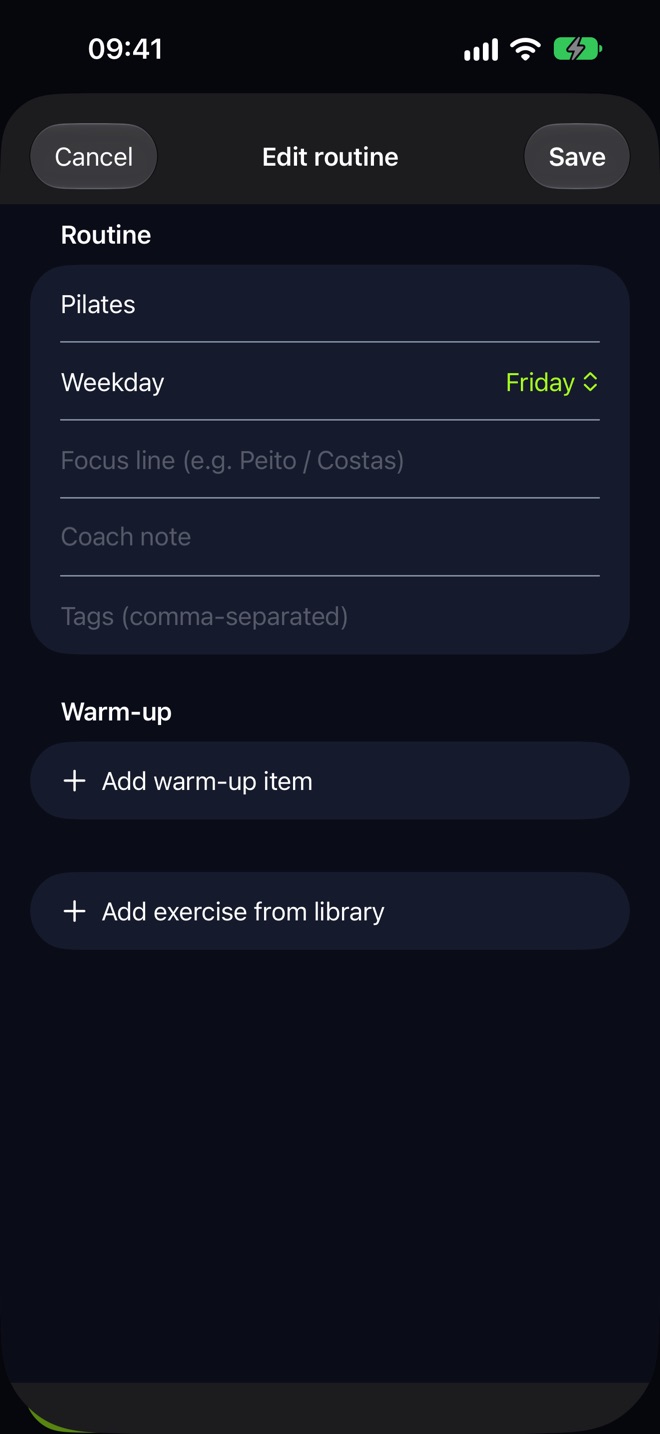
The Warm-up section at the top of a routine is a checklist of movements, such as band pull-aparts × 15 or thoracic rotations 8 / side. Add them in the routine editor with Add warm-up item. On the Train screen they show as Warm-up with a count like 0/6; tick each one off. They are not weighted sets; History records them as a single line, for example “Warm-up & mobility — 6 of 6 done”.
Why and how to warm up: warm-up sets guide.
Questions
Why don't I see Add warm-up sets?
It only appears for loaded exercises (barbell, dumbbell, kettlebell, machine or cable) that have a working weight, no warm-up sets yet and no checked sets, and when Auto warm-up sets is off for that exercise.
Do warm-up sets count toward my volume?
By default, yes. Turn off Settings → Units & totals → Warm-up sets count in totals to leave them out of the set and volume totals.
Can I change a generated warm-up set?
Yes. They're ordinary rows marked WARM-UP. Tap the card and edit the weight or reps like any set.