Key takeaways
- 01Every Wear OS watch can time a strength workout and track heart rate. Weight per set is the hard part.
- 02Galaxy Watch: rep counting exists for a limited list of exercises. Check your watch's list.
- 03Pixel Watch 3 and newer: step-by-step workouts can log reps and weights on the wrist, rolling out since 10 Nov 2026.
- 04LiftLoggr's Android and Wear OS apps are coming to Google Play in early 2027. Not available yet.
On this page
A Wear OS watch records a weightlifting session’s time, heart rate and calorie estimate on its own; sets, reps and weight depend on the app you use. Samsung’s watches count reps for a limited list of exercises, and Pixel Watch 3 and newer can log reps and weights in Google’s step-by-step workouts, rolling out since 10 November 2026.
For a full log with weight on every set, most lifters still pair the watch with a dedicated lifting app. Here’s what each option records, checked on 2026-11-14.
What each option records
| Option | Time, heart rate, calories | Reps | Weight per set | Notes |
|---|---|---|---|---|
| Any Wear OS watch, generic strength workout | Yes | No | No | A heart-rate session with a label |
| Samsung Health on Galaxy Watch | Yes | Counted for some exercises | Not in Samsung’s developer documentation | Rep counting is limited to specific movements |
| Pixel Watch 3+, step-by-step workouts | Yes | Logged on the wrist | Logged on the wrist | Rolling out from 10 Nov 2026; custom routines built in the Google Health app |
| Third-party lifting app with a Wear OS app | Usually, via Wear OS sensors | Logged | Logged | Depends on the app; check offline use and export |
Samsung Galaxy Watch
Samsung’s developer blog shows a repetition counter on Galaxy Watch4 and Watch4 Classic for a set of exercises including deadlift, squat, lunge, bench press, lat pull-down, burpee and several dumbbell movements, read through Wear OS Health Services. Counting reps is not the same as logging a lifting session: the counter doesn’t know the weight on the bar, and it covers a limited list. What Samsung Health’s own app exposes varies by watch and software version, so look at the exercise list on your watch before you rely on it.
Watches older than Galaxy Watch4 run Samsung’s Tizen, not Wear OS. Hevy’s help centre makes the same point about which Galaxy watches its Wear OS app supports.
Google Pixel Watch
On 10 November 2026 Google started rolling out step-by-step workouts for Pixel Watch 3 and newer. You follow a routine you built in the Google Health app, or one from Google Health Coach, with live guidance on the watch, and you can log reps and weights on the wrist. Google’s footnote says Google Health Coach requires a Google Health Premium subscription, the Google Health app and an internet connection. The post doesn’t say whether self-built routines need Premium. The rollout is staged, so an eligible watch may not show it yet.
Google Fit is on its way out
Google says the Google Fit APIs, including the REST API, will be deprecated in 2026, and that developers can no longer sign up for them. It recommends Health Connect for Android apps. Strong’s help centre describes the same move: its Android app dropped Google Fit and added Health Connect. If an old guide tells you to sync your lifting app to Google Fit, it’s out of date.
Third-party lifting apps
A dedicated lifting app with a Wear OS companion is still the most complete option: exercise library, your own routines, weight and reps on every set, rest timer on the wrist. Hevy, for example, has a Wear OS app that installs from the Play Store’s “Available on more devices” section and syncs with its phone app.
When you compare them, ask the questions that matter on a watch:
| Question | Why |
|---|---|
| Can I log weight and reps on the watch, or only tick sets? | Ticking is fine if the phone pre-fills the numbers |
| Does the rest timer start on its own? | Tapping a timer between sets is the job you wanted the watch for |
| Does it work with the phone in a locker, or in a gym with no signal? | Many watch apps need the phone nearby |
| Does it need an account? | Your sets go to someone’s server if it does |
| Can I export my history? | A watch is a remote; the log lives in the app |
How to lift with a Wear OS watch today
- Pick where the log lives. The watch is a remote control; your history lives in an app. Choose that app for its logging and export, then check its watch app.
- Start the workout on the watch so heart rate is recorded for the whole session, not just the sets you tap.
- Pre-fill on the phone. Set up routines with target weights and reps so the watch only needs a tap or a crown turn per set.
- Wear it snug, just above the wrist bone, so the sensor stays in contact when your wrist bends in presses and curls.
- Check where the data ends up. On Android, that’s Health Connect. Make sure your lifting app writes there if you want sessions in one place.
Mistakes
- Chasing the calorie number. It’s an estimate. Use it as a rough trend, never as the goal of a lifting session.
- Expecting rep counting to replace a log. A count without the weight can’t drive progression.
- Recording one session in two apps. The watch maker’s workout and your lifting app can both save the same session, and your totals count it twice. Pick one to record.
- Forgetting the export. Whatever app you choose, find its export before you’ve logged a year of sets. See export your workout data.
LiftLoggr on Wear OS: coming in early 2027
LiftLoggr runs on iPhone and Apple Watch today. The Android app and its Wear OS companion are built and coming to Google Play in early 2027. They are not available yet.
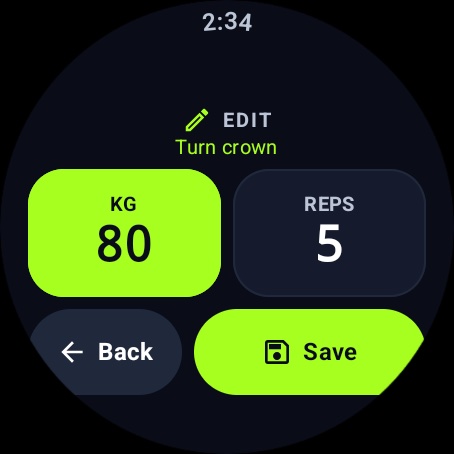
The Wear OS companion follows the Apple Watch one: log weight and reps from the wrist with the crown, run the rest timer, and see the session summary, with heart rate and calories from Wear OS Health Services. Like the iPhone app, it’s built offline-first, with no account and no LiftLoggr server.
Until then, if you lift with an iPhone, the Apple Watch weightlifting guide covers what works on the wrist today.
Questions
Does Wear OS track weightlifting?
It tracks the session: time, heart rate and a calorie estimate. Sets, reps and weight depend on the app. Some Galaxy Watch exercises count reps; Pixel Watch 3 and newer can log reps and weights in step-by-step workouts. For a full lifting log, most people use a dedicated app with a Wear OS companion.
Can a Galaxy Watch count reps?
For some exercises. Samsung's developer documentation lists a repetition counter on Galaxy Watch4 for exercises including deadlift, squat, lunge, bench press and lat pull-down. It doesn't log the weight, and the list is limited, so check the exercises on your own watch.
Is Google Fit still the place lifting apps sync to?
No. Google says the Google Fit APIs will be deprecated in 2026 and recommends Health Connect for Android apps. Lifting apps that sync on Android now use Health Connect.
Is LiftLoggr available on Wear OS?
Not yet. The Android app and its Wear OS companion are coming to Google Play in early 2027. Today LiftLoggr runs on iPhone and Apple Watch.
Sources
- Google blog: Step-by-step workouts on Pixel Watch, 10 Nov 2026 (checked 2026-11-14) blog.google
- Samsung Developers blog: Tracking exercises with Galaxy Watch (2022, checked 2026-11-14) developer.samsung.com
- Google for Developers: Google Fit APIs deprecation (checked 2026-11-14) developers.google.com
- Hevy help centre: Wear OS watch compatibility and syncing (checked 2026-11-14) help.hevyapp.com
- Strong help centre: Google Fit and Health Connect integration (checked 2026-11-14) help.strongapp.io