Key takeaways
- 01Needs an iPhone with iOS 26+ and an Apple Watch with watchOS 26+.
- 02Install from the Watch app on iPhone if it didn't install itself.
- 03Start on iPhone, or tap Start under TODAY on the watch.
- 04Allow Health on the first workout for heart rate and calories.
On this page
Install LiftLoggr on your Apple Watch, then start a workout on your iPhone: the watch picks it up within seconds. From then on you can check sets, change weight and reps, and run the rest timer from the wrist.
Checked against LiftLoggr 1.5.2 for iPhone and Apple Watch.
Before you start
- iPhone with iOS 26 or later, with LiftLoggr installed and opened once.
- Apple Watch with watchOS 26 or later, paired with that iPhone.
- At least one routine on the iPhone (Routines tab).
1. Install the watch app
LiftLoggr usually installs on the watch by itself. If it’s not on the watch:
- On iPhone, open Apple’s Watch app.
- On the My Watch tab, scroll to Available Apps.
- Tap Install next to LiftLoggr.
2. Start a workout
From the iPhone: tap Start workout on Home, or Start on any routine in the Routines tab. Open LiftLoggr on the watch and the workout is there.
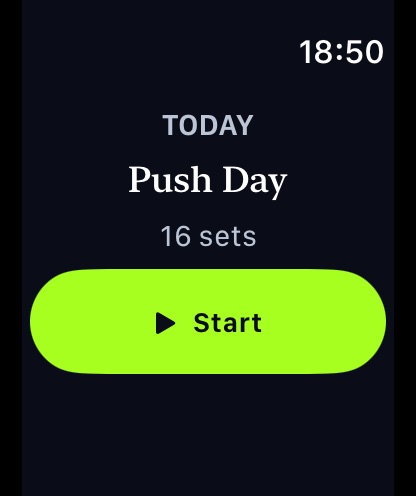
From the watch: open LiftLoggr. If a routine is scheduled for today’s weekday, the screen shows TODAY, the routine name and its set count. Tap Start. If it shows Rest day, start from the iPhone instead.
3. Allow Health access
The first time a workout starts on the watch, watchOS asks to let LiftLoggr save workouts and read heart rate and active energy. Allow it to get the Metrics page and a Traditional Strength Training workout in Apple Health. Without it, logging still works.
4. Log from the wrist
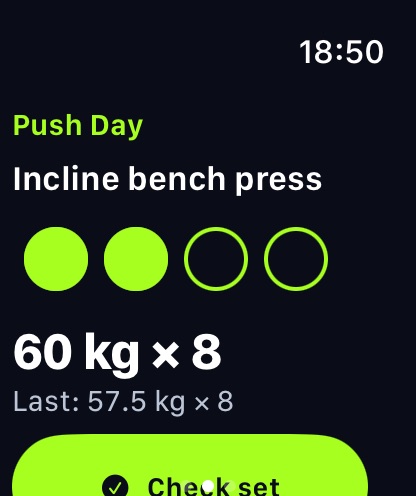
- The Now page shows the exercise, set circles, the target and “Last:” from your previous session.
- Did the target? Tap Check set.
- Different numbers? Tap the target, then KG or REPS, turn the Digital Crown, and tap Save & check (or Save to change without checking).
- Rest takes over the screen: REST, the countdown, +30s and Skip. The watch taps your wrist when it ends.
- Swipe to Metrics for time, heart rate, calories, sets done and volume.
5. Finish
- Swipe to the controls page.
- Tap End, then Save & finish. “The session is saved on your iPhone.”
- The summary shows new PRs, duration, sets, volume, average heart rate and calories. Tap Done.
The same controls page has Pause and Water Lock, and shows whether the iPhone is connected.
Add the complication
Edit your watch face, choose a complication slot and pick LiftLoggr → Workout. It shows live set progress during a workout and today’s routine otherwise.
Apple Health: who writes the workout
| iPhone setting (Settings → My data → Save workouts to Health) | Workout in Apple Health |
|---|---|
| Off (default) | The watch saves it, with measured heart rate and calories |
| On | The iPhone saves it with LiftLoggr’s sets, reps, volume and records; the watch drops its copy |
Either way there’s one workout, not two.
Troubleshooting
| Watch shows | Do this |
|---|---|
| iPhone not reachable | Bring the phone close, check Bluetooth; queued checks send when it reconnects |
| Rest day | Start the routine on iPhone, or give it a weekday in the routine editor |
| Start a workout on iPhone and it appears here | No routine today; start one on the iPhone |
| Nothing after starting on iPhone | Open LiftLoggr on the watch; check it’s installed in the Watch app |
What the watch can and can’t do: Apple Watch workout tracker. Background on Apple’s own Workout app: Apple Watch weightlifting.
Questions
Why does the watch say iPhone not reachable?
The watch can't reach your iPhone. Keep the phone nearby with Bluetooth on and LiftLoggr installed. Set checks you make meanwhile are queued and sent when it reconnects.
Why does the watch say Rest day?
No routine is scheduled for today's weekday. Start any routine on the iPhone and it appears on the watch, or set a weekday in the routine editor.
Can I use the watch without the iPhone?
No. The iPhone runs the workout and keeps your history; the watch is a remote for it. Neither needs internet.