Key takeaways
- 01JEFIT's free tier caps custom exercises at 7, saved plans at 2 and stats history at 14 days.
- 02Want a bigger free tier and ready programs: StrengthLog or Hevy. Want to script progression: Liftosaur.
- 03LiftLoggr has no AI and no adaptive plan. You pick a split, it runs double progression.
- 04Stay with JEFIT for its 1,400+ exercise library with HD video instructions.
On this page
If you like JEFIT’s exercise library but want to run your own program without Elite, the best JEFIT alternatives are StrengthLog for the biggest free tier, Hevy for a free plan library with a social side, and Liftosaur if you’d rather write progression rules than follow suggestions. If you mainly want a log that stays out of the way and does the progression math, LiftLoggr fits; it has no AI and won’t plan your training for you.
LiftLoggr is our app. Facts about JEFIT and the others come from jefit.com, App Store listings (US storefront), Google Play and help centres, checked 2026-11-14. We read the listings; we did not train on each app for weeks.
What JEFIT does well
Start here, because some lifters should stay.
- The exercise library. 1,400+ exercises “with HD video instructions and animations”, plus written steps and tips on jefit.com. Nothing else on this page matches the count with video.
- A routine database. jefit.com has a browsable workout routine database, and Elite adds 400+ plans from professional coaches.
- A plan that adapts. Elite’s Adaptive Plan is “a personalized training plan built around your goal, level, and equipment”, adjusted every week from what you lifted, with a suggested weight for each set.
- Coverage. iPhone, Apple Watch, Android and Wear OS, a muscle recovery chart and body measurements.
Why lifters look for a JEFIT alternative
JEFIT publishes its own Free vs Elite table. The free limits that bite people who program themselves:
| On JEFIT’s free tier | Limit |
|---|---|
| Custom exercises | Up to 7 |
| Plans you can keep | 2 |
| Progress stats history | 14 days |
| Apple Watch workouts | 3, lifetime |
| Instant workouts | 10, lifetime |
| Adaptive Plan, progressive overload, periodization | Elite only |
Elite is US$12.99 a month or US$69.99 a year (US). Logging itself stays free: “Every JEFIT account includes full workout logging, your complete history, the 1,400+ exercise library with demo videos”. The other reason is privacy: JEFIT’s App Store label lists Usage Data used to track you across other companies’ apps and websites.
If you write your own program, you’re paying for planning you don’t use, and the free tier’s 14-day stats window hides the long trend you need to judge it.
The program-it-yourself checklist
A self-written program needs four things from an app. Here’s how the alternatives answer them.
| Your own routines, free | Rep ranges + auto next weight | Long-range history, free | Ready programs to copy | |
|---|---|---|---|---|
| StrengthLog | Yes, unlimited | Linear progression free; double and triple progression Premium | Yes | Yes, popular ones free |
| Hevy | 4 | Progressive overload recommendations are a Hevy Trainer feature (Pro) | 3 months | Free library |
| Strong | 3 | Not described | All charts are PRO | No |
| Liftosaur | Yes | Yes, any rule you script | Yes; graphs are Premium | GZCLP, 5/3/1 and more built in |
| Boostcamp | Yes, “no cap” | Auto-progression listed | Not stated | 11,000+ |
| LiftLoggr | Yes | Double progression, free of planning | Yes | Starter splits plus importable program files |
The 6 alternatives
1. StrengthLog: biggest free tier
StrengthLog’s free tier is the closest to “JEFIT logging without the caps”: unlimited workouts, unlimited custom exercises, 600+ exercises with instructions and video, popular training programs, your own routines with linear progression, plate calculator and rest timer. iPhone, iPad, Apple Watch and Android.
- Fits if you want a big library with video and you’ll write or copy a program.
- Falls short if you need double progression or RIR logging free: both are Premium (1, 3 or 12 months; the US listing shows US$16.90, US$37.90 and US$109.00). It has friends and challenges; your full log stays private.
2. Hevy: free plans, social if you want it
Hevy’s free tier gives 4 routines, a library of pre-made plans (splits, beginner programs, equipment-specific workouts) and “hundreds of exercises with demonstrations”. It runs on iPhone, Android, Apple Watch, Wear OS and the web.
- Fits if you want to copy a plan, tweak it and log it, and maybe follow friends.
- Falls short if you want more than 4 routines or 7 custom exercises free, or long-range stats (3 months free). Its suggested weights live in Hevy Trainer, which is Pro. Hevy needs an account and stores your log on its servers.
3. Strong: the plain logger
Strong lets you build templates and log fast, with an Apple Watch app that logs with or without the iPhone and a library with “a growing library of animated videos”.
- Fits if your program fits in 3 templates or you’ll buy PRO, and you want no feed.
- Falls short if you want the app to calculate next weights: Strong’s listing describes tracking, not progression rules. Charts, the plate calculator and the warm-up calculator are PRO. Account required.
4. Liftosaur: write the program as code
Liftosaur is the purest “program it yourself” app. Programs are text in Liftoscript: Bench Press / 2x5, 1x5+ / 45lb / progress: lp(2.5lb) is one line of its listing’s example. GZCLP, 5/3/1 and others are built in, editable down to the deload. No account required; offline; restorable JSON export.
- Fits if you like spreadsheets with formulas and want the app to run your exact rules.
- Falls short if you don’t want to learn a syntax. Graphs, the Apple Watch app, plates per side and rest-timer notifications are Premium (US$4.99 a month, US$39.99 a year, US$99.99 one-time, US App Store).
5. Boostcamp: the bigger program database
If JEFIT’s routine database is what you’d miss, Boostcamp’s listing claims 11,000+ programs, 130+ from coaches (nSuns, GZCLP, 5/3/1 BBB, PHUL, Reddit PPL and more), and lets you fork any program or build your own “with no cap”. Free to start, no ads, offline logging.
- Fits if you want to pick a named program and run it as written.
- Falls short if you use an Apple Watch (none listed on the US App Store) or care about tracking: its label lists Identifiers as used to track you. It also sells an AI-built plan from a questionnaire, which you can ignore.
6. LiftLoggr: you write it, the app does the arithmetic
LiftLoggr is our app, and it’s built on one idea: the program is yours, the math isn’t your job.
Say it plainly: LiftLoggr has no AI, no adaptive plan and no recovery model. It never picks exercises for you or rewrites your week. What it does:
- Starter splits you pick on first run: Push/Pull/Legs (3 routines), Upper/Lower A/B (4) or Full Body A/B (2), editable, with a weekday schedule.
- Program pages you can import. Every program on /programs/ (for example upper/lower or GZCLP) offers a
.liftloggr.jsonroutine file; open it with LiftLoggr and it becomes routines. - Double progression. Give an exercise a rep range. When every working set reaches the top, the next session pre-fills one step heavier: 2.5 kg on a barbell, or 5 lb. Three sessions in a row below the bottom of the range at the same weight triggers a deload suggestion of about 10 %.
- Last time beside each set, warm-ups built from your first working set, RIR per set, drop sets and supersets.
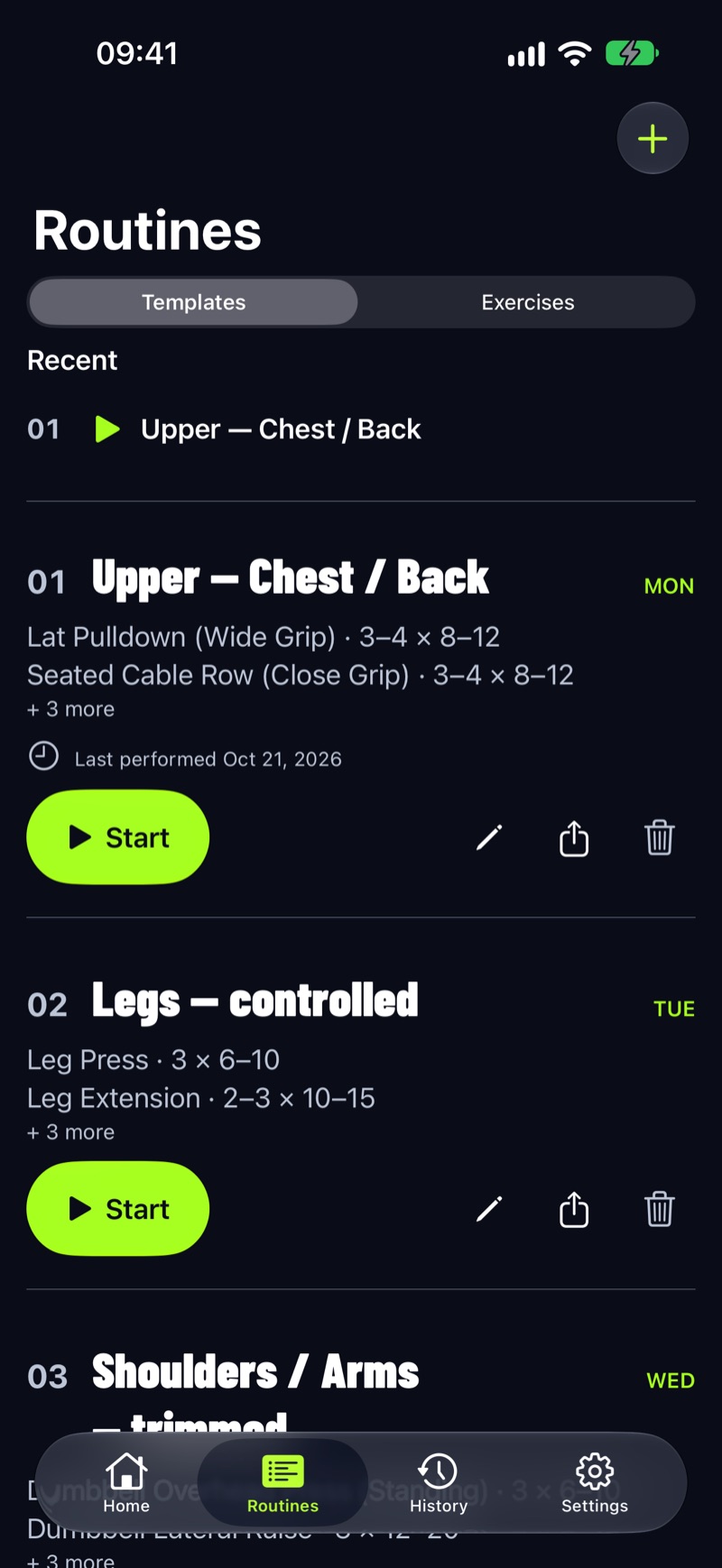
Here’s a bench press run through it, rep range 8–12, 3 working sets:
| Session | Weight | Reps | What LiftLoggr pre-fills next |
|---|---|---|---|
| 1 | 60 kg | 12, 11, 10 | 60 kg (not every set at 12) |
| 2 | 60 kg | 12, 12, 11 | 60 kg |
| 3 | 60 kg | 12, 12, 12 | 62.5 kg (all sets at the top) |
| 4 | 62.5 kg | 9, 8, 8 | 62.5 kg, climb the reps again |
More on the method: double progression.
- Falls short if you rely on video: LiftLoggr’s library is about 500 exercises with text instructions, no video. Also no Android until early 2027, no web planner, and the Watch app is a companion that needs the iPhone app.
Stay with JEFIT if…
- You learn movements from video. 1,400+ exercises with HD video instructions and animations is JEFIT’s clearest edge.
- You want the app to plan your weeks: the Adaptive Plan and 400+ coach plans are what Elite is for.
- You use Wear OS or Android today and want one account across both.
If the videos are the deal-breaker
You don’t have to choose one app for everything. JEFIT says every free account includes “the 1,400+ exercise library with demo videos”, and its exercise pages on jefit.com carry written steps and tips without the app. Learning a movement and logging it are separate jobs. Look the lift up once, write two cues in the exercise note of whatever app you log in (“elbows 45°, touch mid-chest”), and keep the logbook where your history lives. After the first few weeks of a new program you’ll rarely open the video again; you’ll open the log every set.
Replacing JEFIT’s routine database with a written plan
- Count your training days. 3 days: full body. 4 days: upper/lower. 5–6 days: push/pull/legs. New to the gym: beginner gym workout plan.
- Give every exercise a rep range, not a fixed number. 6–10 for big compounds, 10–15 for accessories.
- Run it unchanged for 8 weeks. Change exercises only when one hurts or stalls through a deload.
- Keep your old JEFIT routines as a note for reference; none of the apps on this page documents a JEFIT import.
The full list of written programs is on the programs page.
Questions
What's the best free JEFIT alternative?
StrengthLog has the most generous free tier we checked: unlimited workouts and custom exercises, 600+ exercises with instructions and video, and ready-made programs. Hevy is next, with 4 routines and a free library of plans.
How much is JEFIT Elite?
JEFIT lists Elite at US$12.99 a month or US$69.99 a year in the US, checked 2026-11-14. Prices in the App Store or Google Play are in your local currency and can differ.
Which alternative has the biggest exercise library?
None we checked matches JEFIT's 1,400+ exercises with HD video instructions and animations. StrengthLog lists 600+ with instructions and video. LiftLoggr has about 500 with text instructions only.
Does LiftLoggr build workouts for me like JEFIT Elite?
No. LiftLoggr has no AI and no adaptive plan. You choose a starter split or import a program, and its double progression pre-fills the next weight from what you lifted last time.
Can I bring my JEFIT routines into another app?
None of the apps on this page documents a JEFIT import. Rebuild them by hand, or start from a written program: our program pages offer a routine file that LiftLoggr imports.
Sources
- JEFIT Elite pricing and Free vs Elite table jefit.com
- JEFIT, US App Store listing apps.apple.com
- JEFIT, Google Play listing play.google.com
- JEFIT workout routine database jefit.com
- Strong, US App Store listing apps.apple.com
- Strong help: What is Strong PRO? help.strongapp.io
- Hevy help: 2026 features guide (free vs Pro) help.hevyapp.com
- StrengthLog, US App Store listing apps.apple.com
- Liftosaur, US App Store listing apps.apple.com
- Liftosaur: Premium liftosaur.com
- Boostcamp, US App Store listing apps.apple.com